Hello folks. I’m on vacation but my WordPress write for me this blog post anyway 😀 .
We will create SPFx Web Part which can be used as Address Book for our Company Employees.
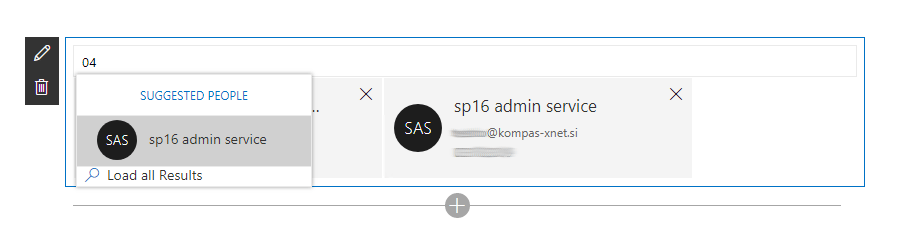
In Office UI Fabric we have PeoplePicker Component which has a lot of different variations. One of them and I think the best option for Address Book is ListPeoplePicker which I want to show you today deeply in this blog post because it isn’t as much documented as you wish.
We have AddressBook React Component class in which you have to import some mandatory classes firstly:
import { assign } from 'office-ui-fabric-react/lib/Utilities';
import { Persona, IPersonaProps, PersonaPresence, PersonaSize } from 'office-ui-fabric-react/lib/Persona';
import {
  IBasePickerSuggestionsProps,
  ListPeoplePicker,
  IPickerItemProps
} from 'office-ui-fabric-react/lib/Pickers';
import { IconButton } from 'office-ui-fabric-react/lib/Button';
Then you have to add three constants outside of React Component class:
const suggestionProps: IBasePickerSuggestionsProps = {
  suggestionsHeaderText: strings.SuggestionsHeaderText
};

const limitedSearchAdditionalProps: IBasePickerSuggestionsProps = {
  searchForMoreText: strings.SearchForMoreText
};

const limitedSearchSuggestionProps: IBasePickerSuggestionsProps = assign(limitedSearchAdditionalProps, suggestionProps);
After that you have to create private ListPeoplePicker variable inside of class for component reference:
private listPeoplePicker: ListPeoplePicker;
In render method you could use ListPeoplePicker as shown in example below.
We creates reference to ListPeoplePicker Component, custom rendering for suggestions items (onRenderSuggestionsItem) and for selected items (onRenderItem).
When suggestions are resolved we use onResolveSuggestions event (this is limited by number of results) and when user click for more result we use onGetMoreResults.
public render(): React.ReactElement<IAddressBookProps> {
    return (
      <div className={ styles.addressBook }>
        <ListPeoplePicker ref={(input) => this.listPeoplePicker = input}
          onResolveSuggestions={this.onResolveSuggestions}
          onRenderSuggestionsItem={this.onRenderSuggestionsItem.bind(this)}
          onRenderItem={this.onRenderItem.bind(this)}
          onGetMoreResults={this.onFilterChanged}
          pickerSuggestionsProps={limitedSearchSuggestionProps}
          className={'ms-PeoplePicker'}
        />
      </div>
    );
}
Here are item rendering methods:
private onRenderSuggestionsItem(props:IPersonaProps):JSX.Element {
    return (<div className={ "ms-Button-flexContainer flexContainer_3696fcf9 flexContainer_9fba0d97" }>
      <div className={ "ms-PeoplePicker-personaContent" }>
        <Persona
            { ...props }
            size={ PersonaSize.small }
            hidePersonaDetails={ false }
        />
      </div>
    </div>);
}

private onRenderItem(props: IPickerItemProps<IPersonaProps>):JSX.Element {
    return (<div className={ "ms-FocusZone ms-PickerPersona-container personaContainer_894c3072" }>
      <div className={ "ms-PickerItem-content itemContent_894c3072" }>
        <Persona
            { ...props.item }
            size={ PersonaSize.regular }
            hidePersonaDetails={ false }
        />
      </div>
      <div className={ "ms-PickerItem-content itemContent_894c3072" }>
        <IconButton
            iconProps={{ iconName: 'Cancel' }}
            title="Cancel"
            ariaLabel="Cancel"
            onClick={ () => { this.ListPeoplePicker_RemoveItem(props.index); } }
          />
      </div>
    </div>);
}

private ListPeoplePicker_RemoveItem(index: number) {
    this.listPeoplePicker.items.splice(index, 1);
    this.listPeoplePicker.forceUpdate();
}
And here are methods for resolving peoples from Search API or directly from AD:
private onResolveSuggestions = (filterText: string, currentPersonas: IPersonaProps[]): IPersonaProps[] | Promise<IPersonaProps[]> => {
    return this.onFilterChanged(filterText, currentPersonas, this.props.maxNrOfUsers);
}

private onFilterChanged = (filterText: string, currentPersonas: IPersonaProps[], limitResults?: number): IPersonaProps[] | Promise<IPersonaProps[]> => {
    return new Promise<IPersonaProps[]>((resolve,reject) => {
        let filteredPersonas: IPersonaProps[] = [];

        // call SharePoint Search API for peoples
        // or custom logic for reading users directly from AD

        filteredPersonas = limitResults ? filteredPersonas.splice(0, limitResults) : filteredPersonas;

        return resolve(filteredPersonas);
    });
}
Cheers!
Gašper Rupnik
{End.}

 RaspeR87's Blog
Leave a comment