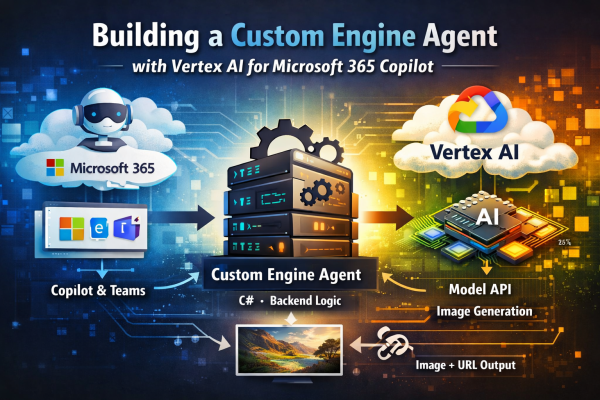
Engineering Data-Driven Readiness for Cloud-Native Applications

Using .NET Aspire to Gate Traffic on Data Availability

Abstract

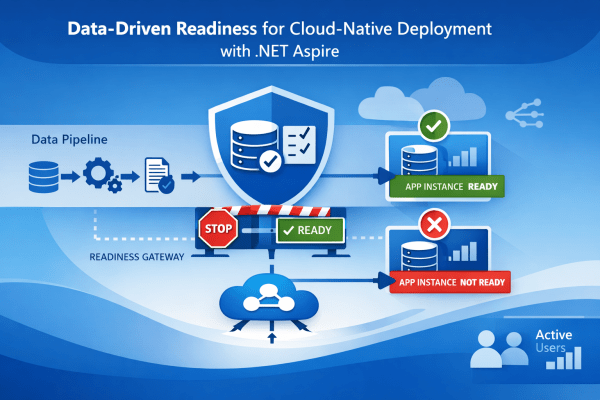
In cloud-native systems, successful deployment does not guarantee operational correctness.
Applications often start correctly, pass basic health checks, and receive production traffic — even though critical data pipelines have not completed initialization.

This article presents a data-driven readiness pattern implemented using .NET Aspire, where application instances are marked Not Ready until essential datasets are verified as available and consistent. The approach ensures that traffic is only routed to instances that can produce correct, deterministic results, not merely respond to HTTP requests.


The Problem: “Healthy” Services That Are Not Ready

Modern platforms (Azure Container Apps, Kubernetes, etc.) distinguish between:

  • Liveness – Is the process alive?
  • Readiness – Can the instance safely receive traffic?

In practice, many systems treat readiness as a shallow check:

  • HTTP endpoint responds
  • Database connection opens
  • Dependency container is reachable

This breaks down for data-dependent services, such as:

  • Retrieval-augmented systems
  • Agent-based pipelines
  • Regulatory or document-driven AI
  • Index-backed APIs

If the underlying dataset is empty, stale, or partially initialized, the service may respond — but with incorrect or misleading output.

Continue reading “Engineering Data-Driven Readiness for Cloud-Native Applications”

Engineering Deterministic Agent-Based AI Systems for Regulatory Domains

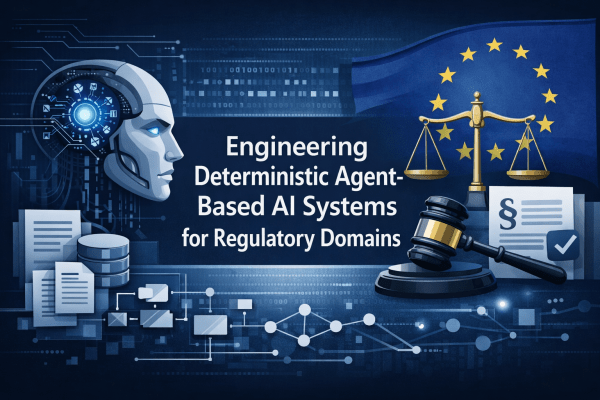
AI systems that operate on European legislation, regulatory texts, and customer policies cannot be built using the same assumptions as general-purpose conversational assistants.

In these domains, answers must be:

  • deterministic,
  • evidence-bound,
  • non-inferential,
  • and reproducible across executions.

This article describes a technical reference architecture and implementation patterns for building agent-based AI systems that intentionally restrict model behavior and prevent speculative output.


1. Problem Definition: Why Probabilistic Answers Are Unacceptable

Large Language Models are probabilistic by nature.
Regulatory systems are not.

Typical failure modes include:

  • inferring missing values (“the date is likely…”),
  • generalizing from similar regulations,
  • merging evidence across documents,
  • translating terminology without an official source.

Key requirement:

If information is not explicitly present in the evidence, the system must not produce it.

This shifts responsibility from the model to the surrounding system.


2. Reference Architecture: Agent Pipeline, Not Chat Completion

A regulatory-grade system should be structured as a deterministic agent pipeline, where each stage is system-controlled.

User Question
Intent Classification (rule-based / constrained)
Retrieval Scope Definition
Keyword + Vector Retrieval
Evidence Pruning & Validation
Bounded LLM Synthesis
Post-Processing Guardrails
Final Answer

Design rule:
The LLM is never allowed to decide what is relevant — only how to phrase validated facts.

Continue reading “Engineering Deterministic Agent-Based AI Systems for Regulatory Domains”

Production-Grade Telemetry for Domain-Aware Agent Systems in .NET (Aspire + OpenTelemetry)

Modern agent-based systems tend to fail in subtle ways.

Not with crashes — but with drift:

  • the “right” document slowly stops being selected,
  • a heuristic fires twice,
  • a preference rule silently stops applying,
  • a language fallback kicks in without anyone noticing.

When this happens in production, logs alone are not enough.
You need structured, stable telemetry that tells you what decision was made, why, and whether it actually mattered.

In this post, I’ll walk through how we hardened telemetry for a domain-aware agent pipeline in .NET using OpenTelemetry + Aspire, focusing on:

  • Deterministic tracing contracts
  • Low-cardinality metrics
  • Drift detection without log spam
  • Developer-friendly local visibility (F5 / dotnet run)

All examples are domain-agnostic and apply to any policy-driven RAG or agent system.


The Problem: “Invisible” Correctness Bugs

In agent systems, many critical behaviors are intentional and non-fatal:

  • a domain preference boosts one document over another,
  • a language fallback is applied,
  • a keyword search is skipped to avoid cross-language drift,
  • a rule matches but is evidence-gated and does nothing.

From the outside, the answer may still look “reasonable”.

Without telemetry, you can’t tell:

  • whether a rule fired,
  • whether it mutated ranking,
  • whether it was blocked by missing evidence,
  • whether it ran once or twice.

So we defined a rule early on:

Every deterministic decision must be observable, cheaply, and in a stable shape.

Continue reading “Production-Grade Telemetry for Domain-Aware Agent Systems in .NET (Aspire + OpenTelemetry)”

Designing Language-Safe AI Systems: Deterministic Guardrails for Multilingual Enterprise AI

Large Language Models are exceptionally good at producing fluent text.
They are not inherently good at knowing when not to answer.

In regulated or compliance-sensitive environments, this distinction is critical.
A linguistically plausible answer that is not grounded in official documentation is often worse than no answer at all.

This article describes a practical architecture for handling language detection, translation intent, and multilingual retrieval in an enterprise AI system — with a strong emphasis on determinism, evidence-first behavior, and hallucination prevention.

The examples are intentionally domain-neutral, but the patterns apply to legal, regulatory, financial, and policy-driven systems.


The Core Problem

Consider these seemingly simple user questions:

"What is E104?"
"Slovenski prevod za E104?"
"Hrvatski prevod za E104?"
"Kaj je E104 v slovaščini?"
"Slovenski prevod za Curcumin?"

At first glance, these look like:

  • definitions
  • translations
  • or simple multilingual queries

A naïve LLM-only approach will happily generate answers for all of them.

But in a regulated environment, each of these questions carries a different risk profile:

  • Some require retrieval
  • Some require translation
  • Some require terminology resolution
  • Some should result in a deterministic refusal

The challenge is not generating text —
it is deciding which answers are allowed to exist.


Key Design Principle: Evidence Before Language

The system described here follows one non-negotiable rule:

Language is applied after evidence is proven, never before.

This means:

  • Language preference never expands the answer space
  • Translation never invents facts
  • Missing official wording is explicitly acknowledged

Continue reading “Designing Language-Safe AI Systems: Deterministic Guardrails for Multilingual Enterprise AI”

End-to-End Integration Testing for Agent-Based Systems with .NET Aspire

Modern agent-based systems are rarely a single executable. They typically consist of multiple cooperating components: agent hosts, orchestrators, background workers, and external dependencies such as Redis, search engines, or AI services.

Testing such systems effectively requires more than unit tests—it requires repeatable, automated, end-to-end integration tests that reflect real runtime behavior.

In this post, I’ll walk through how we implemented stable, fully automated Aspire-based integration tests for an agent system using xUnit and .NET Aspire, without exposing domain-specific details.


Why Traditional Integration Tests Fall Short

In distributed agent architectures, common testing approaches often break down:

  • Running services manually (dotnet run) before tests is error-prone
  • Static ports and connection strings cause conflicts
  • “Is the service ready?” becomes guesswork
  • CI behavior diverges from local development

What we wanted instead was:

  • A single command to run tests
  • The same topology locally and in CI
  • Deterministic startup and shutdown
  • Explicit readiness signaling

This is exactly what .NET Aspire’s testing infrastructure is designed for.


The Aspire Testing Model

Aspire introduces a powerful concept:
tests can bootstrap the entire distributed application.

Using Aspire.Hosting.Testing, an xUnit test can:

  • Start the AppHost
  • Launch all dependent services (agent host, Redis, etc.)
  • Discover dynamically assigned ports
  • Communicate via real HTTP endpoints
  • Tear everything down automatically

In other words, the test becomes the orchestrator.

Continue reading “End-to-End Integration Testing for Agent-Based Systems with .NET Aspire”

Solving Hierarchical List Parsing in Legal Documents (Without LLM Guessing)

When working with legal or regulatory documents (such as EU legislation), one of the deceptively hard problems is correctly modeling hierarchical lists. These documents are full of nested structures like:

  • numbered paragraphs (1., 2.),
  • lettered items ((a), (b)),
  • roman numerals ((i), (ii), (iii)),

often mixed with free-text paragraphs, definitions, and exceptions.

At first glance, this looks simple. In practice, it’s one of the main sources of downstream errors in search, retrieval, and AI-assisted answering.

The Core Problem

HTML representations of legal texts (e.g. EUR-Lex) are structurally inconsistent:

  • nesting depth is not reliable,
  • list items are often rendered using generic <div> grids,
  • numbering may reset visually without resetting the DOM hierarchy,
  • multiple paragraphs can belong to the same logical list item.

If you naïvely chunk text or rely on DOM depth alone, you end up with:

  • definitions split across chunks,
  • list items grouped incorrectly,
  • or worst of all: unrelated provisions merged together.

Once this happens, downstream agents or LLMs are forced to guess structure — which leads to hallucinations, missing conditions, or incorrect legal interpretations.

The Design Goal

The goal was not to “understand” the document using an LLM.

The goal was to:

  • encode the document’s logical structure deterministically at index time, so that:
    • list hierarchy is explicit,
    • grouping is stable,
    • and retrieval can be purely mechanical.

In other words: make the data correct so the AI doesn’t have to be clever.

Continue reading “Solving Hierarchical List Parsing in Legal Documents (Without LLM Guessing)”

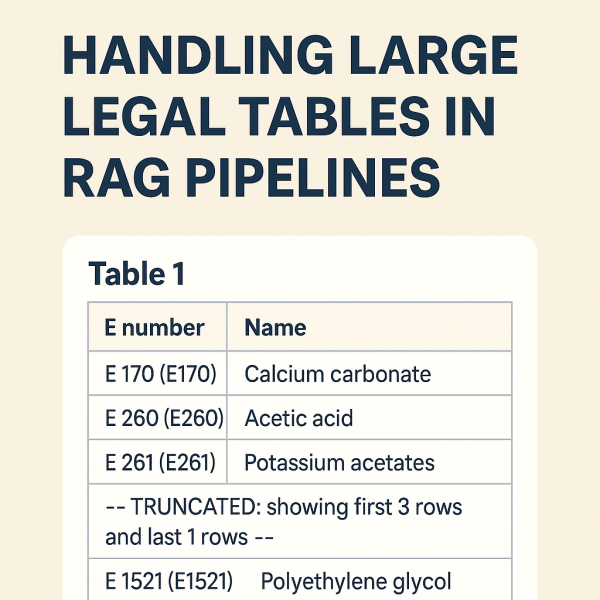
From “Table 1” to Searchable Knowledge

A Practical Guide to Handling Large Legal Tables in RAG Pipelines

When working with legal documents—especially EU legislation like EUR-Lex—you quickly run into a hard problem: tables.

Not small tables.
Not friendly tables.
But hundreds-row, multi-page tables buried inside 300+ page PDFs, translated into 20+ languages.

If you are building a Retrieval-Augmented Generation (RAG) system, naïvely embedding these tables almost always fails. You end up with embeddings that contain nothing more than:

“Table 1”

…and none of the actual data users are searching for.

This post describes a production-grade approach to handling large legal tables in a RAG pipeline, based on real issues encountered while indexing EU regulations (e.g. Regulation (EC) No 1333/2008).


The Core Problem

Let’s start with a real example from EUR-Lex:

ANNEX III
PART 6
Table 1 — Definitions of groups of food additives

The table itself contains hundreds of rows like:

  • E 170 — Calcium carbonate
  • E 260 — Acetic acid
  • E 261 — Potassium acetates

What goes wrong in many pipelines

  1. The table heading (“Table 1”) is detected as a section.
  2. The actual <table> element is ignored or stored separately.
  3. Embeddings are generated from the heading text only.

Result:

Embedding text length: 7
Embedding content: "Table 1"

The data exists visually—but not semantically.


Design Goals

We defined a few non-negotiable goals:

  1. The table must be searchable
    Queries like “E170 calcium carbonate” must hit the table.
  2. IDs must be stable and human-readable
    ANNEX_III_PART_6_TABLE_1 is better than _TBL0.
  3. Structured data must be preserved
    We want JSON rows for precise answering, not just text.
  4. Embeddings must stay within limits
    Some tables have hundreds of rows.
Continue reading “From “Table 1” to Searchable Knowledge”

Why General AI Assistants Aren’t Enough: The Case for Domain-Specific Enterprise AI Systems

Over the past two years, the tech landscape has been transformed by generative AI tools like Microsoft Copilot, ChatGPT, Gemini, and others. These assistants have become essential for daily productivity: they summarize documents, write code, answer questions, and drastically improve workflows.

But as soon as organizations begin exploring serious automation of regulated, multi-step, domain-specific processes, one reality becomes clear:

General-purpose AI assistants are not built for high-precision enterprise use cases.

This isn’t a flaw — it’s simply not their mission.
For enterprise-grade scenarios, businesses require specialized, data-aware, multi-agent AI systems designed for accuracy, compliance, and internal knowledge integration.

Here’s why.


1. Data Access ≠ Domain Understanding

Copilot and similar tools can read files from SharePoint, Teams, OneDrive, and other sources.
However, access alone does not create understanding.

General assistants cannot:

  • interpret industry-specific document structures,
  • follow multi-step regulatory logic,
  • understand cross-referenced obligations,
  • map documents across markets or jurisdictions,
  • align internal and external rules,
  • or execute deterministic procedures.

They are trained for broad, generic reasoning — not domain-structured reasoning.

Domain-specific enterprise AI systems, in contrast, are built to:

  • model relationships between documents,
  • extract structured information,
  • classify data reliably,
  • apply rule-based logic,
  • and reason across heterogeneous sources.

2. Enterprise AI Requires Traceability — Not Just an Answer

General AI models work probabilistically: they return the most likely answer.

Enterprise workflows demand something different:

  • exact citations,
  • section and paragraph references,
  • version and source transparency,
  • reproducibility,
  • evidence of reasoning,
  • strict alignment with regulatory text.

Productivity assistants cannot guarantee any of these.
Enterprise AI must — especially in domains such as:

  • compliance,
  • legal obligations,
  • regulatory affairs,
  • quality assurance,
  • product safety,
  • documentation governance.

Without traceability, AI cannot operate in regulated environments.

Continue reading “Why General AI Assistants Aren’t Enough: The Case for Domain-Specific Enterprise AI Systems”

Building a Custom Notification Center for SharePoint On-Prem – My Thrive 2023 Session

At Thrive Conference 2023, I delivered a session focused on something I’ve been working with for over 15 years: SharePoint On-Premises.
Specifically, I presented how to build a modern, unified Notification Center that brings SharePoint alerts into the modern world—similar to notification models users know from Facebook, LinkedIn, Twitter, Teams, and other platforms.

This solution is not a workaround or enhancement of “Alert Me.”
It is a complete three-step architecture, built specifically for SharePoint On-Prem environments where modern cloud features are not available.

All content in this post comes directly from the session’s slides.
📑 Slides: https://rasper87.blog/wp-content/uploads/2025/11/spnotificationcenter_thrive2023.pdf


Why a Custom Notification Center?

SharePoint’s built-in Alert Me feature is simple, but limited:

  • Users must manually turn it on
  • Notifications arrive only via email or SMS
  • Emails are often ignored
  • The look & feel is outdated
  • No unified overview of activities across the portal

Modern intranets need something more:

  • Centralized
  • Non-intrusive
  • Always visible
  • Configurable
  • Secure
  • And ideally: looks and behaves like notifications in social networks

This is exactly what the Notification Center provides.

Continue reading “Building a Custom Notification Center for SharePoint On-Prem – My Thrive 2023 Session”

My Four NTK 2022 Sessions – Published at Last

Back in 2022, I had one of my most active conference years ever.
I delivered four separate talks at the NTK conference—covering .NET MAUI, Blazor, cross-platform development, and even a deep dive into one of the very first production .NET MAUI apps in Slovenia.

For various reasons, I never managed to publish these sessions on my blog, even though I did that regularly in previous years. So today I’m finally fixing that and adding all four NTK 2022 talks here—better late than never.

After 2022, I took a two-year break from speaking…
…but this year, I’m back on stage again. 😊

Below are summaries of all four talks in the order they were delivered.


1) Build a Mobile or Desktop App with .NET MAUI

📍 Europa B+D
📑 Slides: https://rasper87.blog/wp-content/uploads/2025/11/1_ustvarimobilnoalinamiznodotnetmaui.pdf

This session introduced the fundamentals of .NET MAUI, Microsoft’s modern cross-platform framework that allows developers to build native mobile and desktop applications from a single shared codebase.

Key topics:

  • One project for Android, iOS, Windows, macOS, and Linux
  • Native access to device-specific features
  • UI built with XAML that compiles to native controls
  • Live demos covering:
    • layouts
    • navigation
    • REST API calls
    • using a local SQLite database
    • handling platform-specific features
  • Introduction to MAUI + Blazor Hybrid, enabling HTML/CSS/C# UI inside a native MAUI shell

The goal was to give attendees a clear picture of how MAUI simplifies cross-platform development and why it’s becoming a key part of the .NET ecosystem.


2) .NET MAUI Blazor – Build a Universal App with HTML, CSS, and C#

📍 Emerald 1
📑 Slides: https://rasper87.blog/wp-content/uploads/2025/11/2_mauiblazor.pdf

The second session focused on the powerful combination of .NET MAUI + Blazor, showing how developers can build a single codebase that runs as:

  • a desktop app
  • a mobile app
  • and even a web app

all by using HTML, CSS, and C#.

Highlights:

  • Explanation of MAUI Blazor architecture
  • Benefits of reusing the same components across platforms
  • How BlazorWebView integrates web UI inside a native MAUI app
  • Multiple live demos demonstrating shared UI logic

The session showed how MAUI Blazor provides a path for .NET developers who prefer web technologies but still want native performance and full device access.

Continue reading “My Four NTK 2022 Sessions – Published at Last”

Website Powered by WordPress.com.

Up ↑