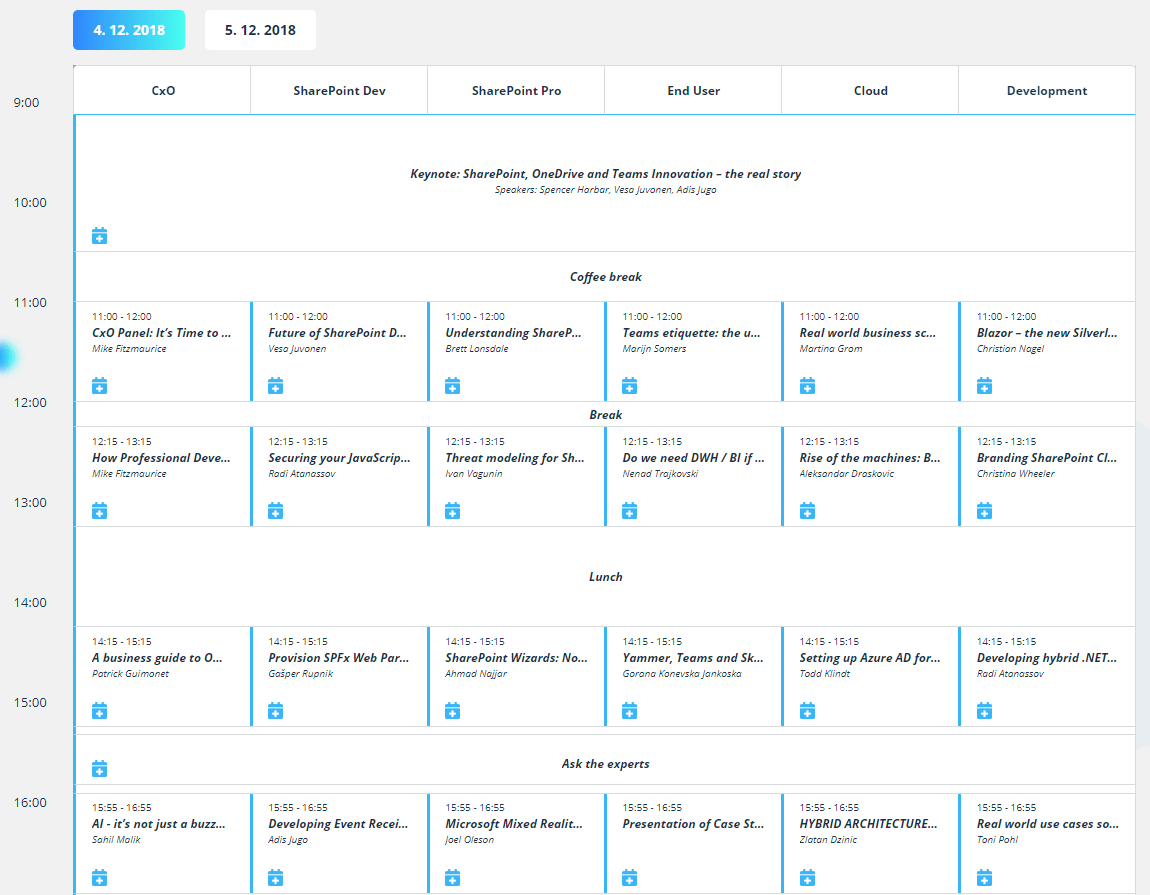
Today I want to show you how easy you could create Schedule Web Part in SharePoint Framework.
I took Schedule Template from CodyHouse, rewrite & extent it into a TypeScript language, put it into class named SchedulePlan inside of SchedulePlan.tsx file and used it inside of my test schedule-webpart SPFx project.
This web part, visually branded by my co-worker, was used for Thrive Conference organized by us @ Kompas Xnet, December 4-5, 2018 – Ljubljana, Slovenia.
So, as I mentioned above, you could use SchedulePlan.tsx from my GitHub inside of your SPFx Web Part.
You have to include it into your SPFx project and make reference to it inside of your React Component:
import SchedulePlan from '../controls/SchedulePlan';Then you could use it from constructor call with DOM element parameter inside of SPFx componentDidMount() method:
public componentDidMount() {
  var schedule = $('.cd-schedule');
  if(schedule != null) {
    this.schedulePlan = new SchedulePlan(schedule);
  }
}
As you could see you have to use Jquery:
npm install --save jqueryYou have to put html template with cd-schedule class named node and list of tracks and events inside of SPFx render() method:
public render(): React.ReactElement<IDayProps> {

    // ...

    return (
      <div className="cd-schedule">

        <div className="timeline">
          <ul>
            { timeline }
          </ul>
        </div>

        <div className="events">
          <ul>
            {
              this.props.tracks.sort((a,b) => {
                // ...
              }).map((item) => {

                return (
                  <li className="events-group" style={{ "width": trackWidth + "%" } }>
                    <div className="top-info" style={{ "width": "100%" }}><span>{ item.Name }</span></div>
                    <ul>
                      {
                        this.props.sessions.filter((itemSession) => item.Id.indexOf(itemSession.SSTrackId) >= 0).map((itemSession) => {
                          // ...

                          return (
                            <li className="single-event" data-sid={itemSession.sID} data-wid={itemSession.wID} data-iid={itemSession.iID} data-id={itemSession.ID} data-location={itemSession.Location} data-dtFrom={dtFrom} data-dtTo={dtTo} data-start={moment(itemSession.SSFrom).format("HH:mm")} data-end={moment(itemSession.SSTo).format("HH:mm")} data-content={itemSession.Url} data-event="event-1">
                              <a href="#0">
                                <em className="event-name">{itemSession.SSTitle}</em>
                                <em className="event-author">{itemSession.SSSpeakers}</em>
                              </a>
                              <div>
                                <img src="/_layouts/15/images/Xnet.SP.ThriveConf/koledar.png" style={{ cursor: "pointer" }} onClick={() => { this.schedulePlan.downloadICS(itemSession.ID, itemSession.SSTitle, itemSession.Location, dtFrom, dtTo); }} />
                                {
                                  this.props.showSurvey ?
                                  <img src="/_layouts/15/images/Xnet.SP.ThriveConf/level.png" style={{ cursor: "pointer" }} onClick={() => { this.schedulePlan.openSurvey(itemSession.sID, itemSession.wID, itemSession.iID); }} /> : <span></span>
                                }
                              </div>
                            </li>
                          );
                        })
                      }
                    </ul>

                  </li>
                );
              })
            }
          </ul>
        </div>

        <div className="event-modal">
          <header className="header">
            <div className="content">
              <span className="event-date"></span>
              <h3 className="event-name"></h3>
              <span className="event-author"></span>
              <img src="/_layouts/15/images/Xnet.SP.ThriveConf/koledar.png" className="event-ics" />
              {
                this.props.showSurvey ?
                <img src="/_layouts/15/images/Xnet.SP.ThriveConf/level.png" className="event-survey" /> : <span></span>
              }
              <span className="event-sid" style={{"display": "none"}}></span>
              <span className="event-wid" style={{"display": "none"}}></span>
              <span className="event-iid" style={{"display": "none"}}></span>
            </div>

            <div className="header-bg"></div>
          </header>

          <div className="body">
            <div className="event-info">
              <iframe id="ifmReport" style={{ overflow: "hidden", width:"100%", height:"560" }} width="100%" height="560" >
              </iframe>
            </div>
            <div className="body-bg"></div>
          </div>

          <a href="#0" className="close">Close</a>
        </div>

        <div className="cover-layer"></div>

      </div>
    );
}
Happy coding folks!
Cheers!
Gašper Rupnik
{End.}

 RaspeR87's Blog
Leave a comment