
Today I want to show you, how you could add custom button to the right side of top Office 365 SharePoint SuiteNav / SuiteBar like in an image above.
For this suitenav we don’t have any official way in SharePoint 2016 like we have at SharePoint 2013 with SuiteLinks Delegate Controls.
Officially you could add only custom tiles on your App Launcher to the left side of SuiteNav named App Launcher Tiles – but only with SharePoint 2016 Feature Pack 1.
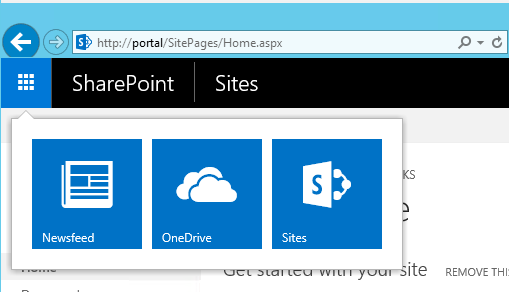
So we have to go in own way. I want to share with you how I have done this with JavaScript and a lil’bit hacking.
Just for information -> suitenav links are officially created with JavaScipt too.
All you need is one JavaScript file which run everytime any SharePoint page is loaded. So you have to add it into Master Page (on-prem) or you have to create SPFx Application Customizer (cloud).
In that script you have to put code like that below. Custom button is added between “our custom button START” and “our custom button END” comments.
As you can see you have to wait for suitenav.js file execution and then rewrite _o365sg2c.O365Shell._renderInternal$p render function. But first of all you have to call ClearSuiteLinksCache() function.
ClearSuiteLinksCache();

$(document).ready(function () {
    SP.SOD.executeFunc("suitenav.js", "_o365sg2c.O365Shell._renderInternal$p", function () {

        _o365sg2c._rightMenusMouseRenderer.render = function (j, i) {
            var a = document.createElement("span");
            a.className = "o365cs-nav-rightMenus";
            var b = document.createElement("div");
            b.className = "o365cs-nav-topItem";
            _o365sg2c._rightMenusMouseRenderer._renderShareButton$p(b, i);
            a.appendChild(b);
            var c = document.createElement("div");
            c.className = "o365cs-nav-topItem o365cs-rsp-off-hide o365cs-rsp-m-hide o365cs-rsp-tw-hide o365cs-rsp-tn-hideIfAffordanceOn";
            _o365sg2c._rightMenusMouseRenderer._renderAffordance$p(c);
            a.appendChild(c);
            if (_o365sg2c.O365Shell._$$pf_ShellData$p.WorkloadLinks || _o365sg2c.O365Shell._$$pf_ShellData$p.PinnedApps) {
                var e = document.createElement("div");
                e.className = "o365cs-nav-topItem o365cs-rsp-off-hide o365cs-rsp-m-hide o365cs-rsp-tn-hideIfAffordanceOff";
                _o365sg2c._rightMenusMouseRenderer._renderNavMenu$p(e);
                a.appendChild(e);
            }

			// our custom button START
            var rr87 = document.createElement("div");
            rr87.className = "o365cs-nav-topItem o365cs-rsp-tn-hideIfAffordanceOff";
            _o365sg2c._rightMenusMouseRenderer._renderNotificationCenter$p(rr87);
            a.appendChild(rr87);
			// our custom button END

            var d = document.createElement("div");
            d.className = "o365cs-nav-topItem o365cs-rsp-tn-hideIfAffordanceOff";
            _o365sg2c._rightMenusMouseRenderer._renderSettings$p(d);
            a.appendChild(d);
            var g = document.createElement("div");
            g.className = "o365cs-nav-topItem o365cs-rsp-tn-hideIfAffordanceOff";
            _o365sg2c._rightMenusMouseRenderer._renderHelp$p(g);
            a.appendChild(g);

            if (_o365sg2c.O365Shell._$$pf_ShellData$p.UserDisplayName) {
                var h = document.createElement("div");
                h.className = "o365cs-nav-topItem o365cs-rsp-tn-hideIfAffordanceOn";
                _o365sg2c._rightMenusMouseRenderer._renderMe$p(h);
                a.appendChild(h);
            }
            if (_o365sg2c.O365Shell._$$pf_ClientData$p.SignInLink) {
                var f = document.createElement("div");
                f.className = "o365cs-nav-topItem o365cs-rsp-tn-hideIfAffordanceOn";
                _o365sg2c._rightMenusMouseRenderer._renderSignIn$p(f);
                a.appendChild(f);
            }
            j.appendChild(a);
        };

        _o365sg2c._rightMenusMouseRenderer._renderNotificationCenter$p = function (c) {
            var b = _o365sg2c._controls.button();
            b.id = "O365_MainLink_NotificationCenter";
            _o365sg2c._domElementExtensions.addClass(b, "o365cs-nav-item o365cs-nav-button o365cs-topnavText ms-bgc-tdr-h");
            _o365sg2c._domElementExtensions.ariaHasPopup(b, true);
            _o365sg2c._domElementExtensions.ariaLabel(b, "Notification Center");
            _o365sg2c._domElementExtensions.role(b, "menuitem");
            var f = _o365sg2c._controls.icon(new _o365sg2cm.ShellIconId("bell", 18));
            b.appendChild(f);

            var rr87Nr = $("<div id='O365_MainLink_NotificationCenter_Nr' style='display:none; right:7px; top:8px; position:absolute; border-radius:16px; background-color:white; color:black; min-width:16px; height:16px; text-align:center;'></div>")[0];
            b.appendChild(rr87Nr);

            c.id = "O365_MainLink_NotificationCenter_OuterDiv";
            c.appendChild(b);

            NotificationCenter_GetMyNotifications(c, b);
        };
    });
});

function NotificationCenter_GetMyNotifications(c, b) {
    var dfd = jQuery.Deferred();

    // dobi število novih zadev
    $.ajax({
        url: "get content for your dropdown of suitenav button",
        data: JSON.stringify({
            outerDivId: c.id
        }),
        type: "POST",
        cache: false,
        dataType: 'json',
        contentType: "application/json; charset=utf-8"
    })
    .done(function (data) {
        var rr87Nr = $("div#O365_MainLink_NotificationCenter_Nr");
        if (data.Data.nrOfNewNotifications > 0) {
            rr87Nr.css("display", "block");
        } else {
            rr87Nr.css("display", "none");
        }
        rr87Nr.text(data.Data.nrOfNewNotifications);

        var a = _o365sg2c._controls.contextMenu(b);
        a.style[_o365sg2c.O365Shell._$$pf_ClientData$p.IsRTL ? "left" : "right"] = "-1px";
        a.style["max-width"] = "460px";

        var rr87 = $("<div style='padding:0px; margin:10px; font-size:12px; text-align:left;'>" + data.Data.render + "</div>")[0];
        a.appendChild(rr87);

        c.style.position = "relative";
        c.appendChild(a);

        dfd.resolve(data.Data.nrOfNewNotifications);
    })
    .fail(function () {
        dfd.reject(-1);
    });

    return dfd.promise();
}
And that is all – “simple as pasulj” 🙂
Happy coding folks!
Cheers!
Gašper Rupnik
{End.}

 RaspeR87's Blog
Thanks for this post. I had to make some modifications to the script to make it work for me, since my script would always run after the initial suitenav render. First, I had to re-render the suitenav in my $(document).ready function:
//Re-render suitenav
_o365sg2c._sharedHeaderMouseRenderer.render(_o365sg2c.O365Shell._$$pf_TopElement$p); //TopElement = #suiteBarTop
Secondly, the tag that styles the suitenav wouldn’t be loaded. Here’s the fix (run this code after the render() function above):
//Generates the CSS that goes inside the tag for suitenav
var additionalCssText;
SuiteNavTheming.WithSuiteThemingCss(function (suiteThemingCss) {
additionalCssText = suiteThemingCss;
});
//Mostly-native SP code that generates + injects the tag for suitenav
var suiteNavRenderingDiv = document.getElementById(“suiteBarTop”);
CSSUtil.RemoveClass(suiteNavRenderingDiv, “ms-TopBarBackground-bgColor”);
if (Boolean(additionalCssText) && suiteNavRenderingDiv != null) {
var firstChildOfSuiteLinksDiv = suiteNavRenderingDiv.firstChild;
var styleElement = document.createElement(“style”);
styleElement.id = “SuiteNavThemeStyle”;
styleElement.type = “text/css”;
SPThemeUtils.ReplaceCssTextForElement(styleElement, additionalCssText);
if (firstChildOfSuiteLinksDiv != null) {
suiteNavRenderingDiv.insertBefore(styleElement, firstChildOfSuiteLinksDiv);
}
else {
suiteNavRenderingDiv.appendChild(styleElement);
}
}
Hi, what is the url format to display the drop-down menu?
In this line: url: “get content for your dropdown of suitenav button”
Thanks.