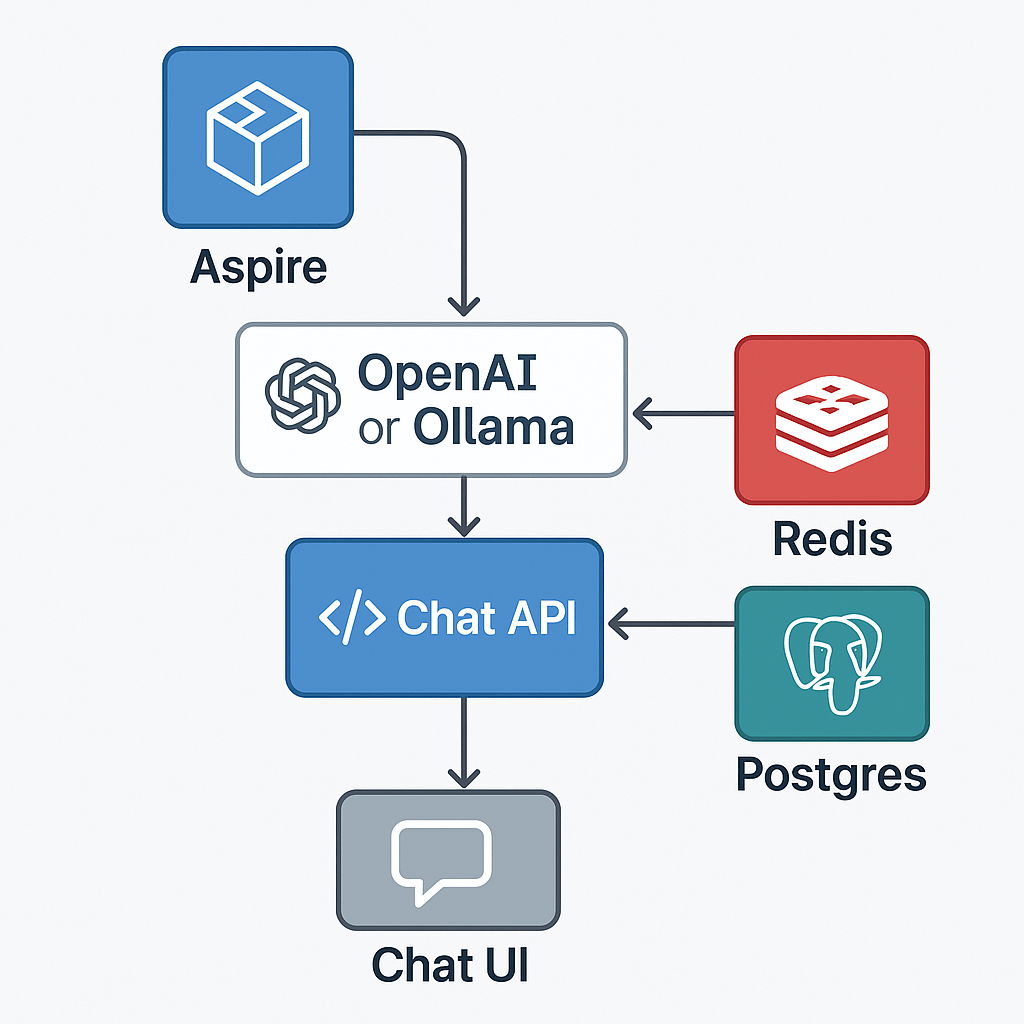
With .NET Aspire, you can orchestrate a full AI chat system — backend, model, data store, and frontend — from one place.
This sample shows how Aspire can manage a large language model (LLM), a Postgres conversation database, a Redis message broker, and a React-based chat UI, all within a single orchestration file.
Folder layout
11_AIChat/
├─ AppHost/ # Aspire orchestration
├─ ChatApi/ # .NET 9 backend API (SignalR + EF)
├─ chatui/ # React + Vite frontend
├─ ServiceDefaults/ # shared settings (logging, health, OTEL)
└─ README.md
Overview
This example demonstrates:
- AI model orchestration with local Ollama or hosted OpenAI
- Postgres database for conversation history
- Redis for live chat streaming and cancellation coordination
- Chat API using ASP.NET Core + SignalR
- React/Vite frontend for real-time conversations
- Full Docker Compose publishing via Aspire
The AppHost (orchestration)
AppHost/Program.cs
var builder = DistributedApplication.CreateBuilder(args);

// Publish this as a Docker Compose application
builder.AddDockerComposeEnvironment("env")
       .WithDashboard(db => db.WithHostPort(8085))
       .ConfigureComposeFile(file =>
       {
           file.Name = "aspire-ai-chat";
       });

// The AI model definition
var model = builder.AddAIModel("llm");

if (OperatingSystem.IsMacOS())
{
    model.AsOpenAI("gpt-4o-mini");
}
else
{
    model.RunAsOllama("phi4", c =>
    {
        c.WithGPUSupport();
        c.WithLifetime(ContainerLifetime.Persistent);
    })
    .PublishAsOpenAI("gpt-4o-mini");
}

// Postgres for conversation history
var pgPassword = builder.AddParameter("pg-password", secret: true);

var db = builder.AddPostgres("pg", password: pgPassword)
                .WithDataVolume(builder.ExecutionContext.IsPublishMode ? "pgvolume" : null)
                .WithPgAdmin()
                .AddDatabase("conversations");

// Redis for message streams + coordination
var cache = builder.AddRedis("cache").WithRedisInsight();

// Chat API service
var chatapi = builder.AddProject<Projects.ChatApi>("chatapi")
                     .WithReference(model).WaitFor(model)
                     .WithReference(db).WaitFor(db)
                     .WithReference(cache).WaitFor(cache);

// Frontend served via Vite
builder.AddNpmApp("chatui", "../chatui")
       .WithNpmPackageInstallation()
       .WithHttpEndpoint(env: "PORT")
       .WithReverseProxy(chatapi.GetEndpoint("http"))
       .WithExternalHttpEndpoints()
       .WithOtlpExporter()
       .WithEnvironment("BROWSER", "none");

builder.Build().Run();
Highlights
- Cross-platform model strategy:
- macOS → use OpenAI API
- Linux/Windows → use Ollama (
phi4) with optional GPU
- Unified Compose publishing:
Aspire generates a working multi-service Docker Compose file (aspire-ai-chat). - Dashboard: available on port 8085
- Frontend → API → LLM → Redis → DB chain all orchestrated automatically
Model extensions
The ModelExtensions.cs file encapsulates reusable logic for switching between OpenAI and Ollama, handling runtime vs publish modes cleanly:
public static class ModelExtensions
{
    public static IResourceBuilder<AIModel> RunAsOllama(...) { ... }
    public static IResourceBuilder<AIModel> AsOpenAI(...) { ... }
    public static IResourceBuilder<AIModel> PublishAsOpenAI(...) { ... }
    // etc.
}
This design pattern lets you define AI orchestration as code — a small but powerful abstraction layer in Aspire.
Chat API service
ChatApi/Program.cs
var builder = WebApplication.CreateBuilder(args);

builder.AddServiceDefaults();
builder.AddChatClient("llm");
builder.AddRedisClient("cache");
builder.AddNpgsqlDbContext<AppDbContext>("conversations");

builder.Services.AddSignalR();
builder.Services.AddSingleton<ChatStreamingCoordinator>();
builder.Services.AddHostedService<EnsureDatabaseCreatedHostedService>();

builder.Services.AddSingleton<IConversationState, RedisConversationState>();
builder.Services.AddSingleton<ICancellationManager, RedisCancellationManager>();

var app = builder.Build();

app.MapDefaultEndpoints();
app.MapChatApi();
app.Run();
Chat API endpoints
ChatExtensions.cs
app.MapGroup("/api/chat")
   .MapGet("/", db => db.Conversations.ToListAsync())
   .MapPost("/", async (NewConversation conv, AppDbContext db) => { ... })
   .MapPost("/{id}", async (Guid id, Prompt prompt, ChatStreamingCoordinator streaming) => { ... })
   .MapDelete("/{id}", async (Guid id, AppDbContext db) => { ... })
   .MapHub<ChatHub>("/stream", o => o.AllowStatefulReconnects = true);
The API exposes:
/api/chat→ CRUD for conversations/stream→ SignalR hub for live streaming/cancel→ Cancel active message generation (handled via Redis)
Frontend (chatui)
The UI is built with React + Vite.
When run under Aspire, it’s automatically served and reverse-proxied to the Chat API:
// vite.config.js
export default defineConfig({
  server: {
    proxy: {
      '/api': 'http://localhost:5000'
    }
  }
})
It connects to SignalR for live updates and streams message fragments in real time.
Data & State
- Postgres stores conversations and messages
- Redis handles:
- Live message broadcasting
- Conversation cancellation coordination
- SignalR enables multi-client real-time chat sync
Publishing to Docker Compose
Run:
aspire publish -o docker-compose-artifactsThis creates a multi-service docker-compose.yaml including:
- Aspire Dashboard
- Chat API
- Redis & RedisInsight
- Postgres & PgAdmin
- Ollama or OpenAI connector
- React UI
You can deploy or run locally via:
cd docker-compose-artifacts
docker compose up -d
Running locally
From the Aspire solution root:
dotnet run --project AppHostThen open:
- Dashboard: http://localhost:8085
- Chat UI: http://localhost:5173 (proxied via Aspire)
- Chat API: http://localhost:5000/api/chat
- Model / Redis / PgAdmin: managed automatically
Key Takeaways
- .NET Aspire makes AI orchestration declarative — you define your entire LLM pipeline as C# code.
- Easily switch between Ollama (local GPU inference) and OpenAI (cloud inference).
- Manage all services (frontend, backend, database, cache, model) in a single, reproducible environment.
- Build, test, and publish to Docker Compose with one command.
That’s all folks!
Cheers!
Gašper Rupnik
{End.}

 RaspeR87's Blog
Leave a comment