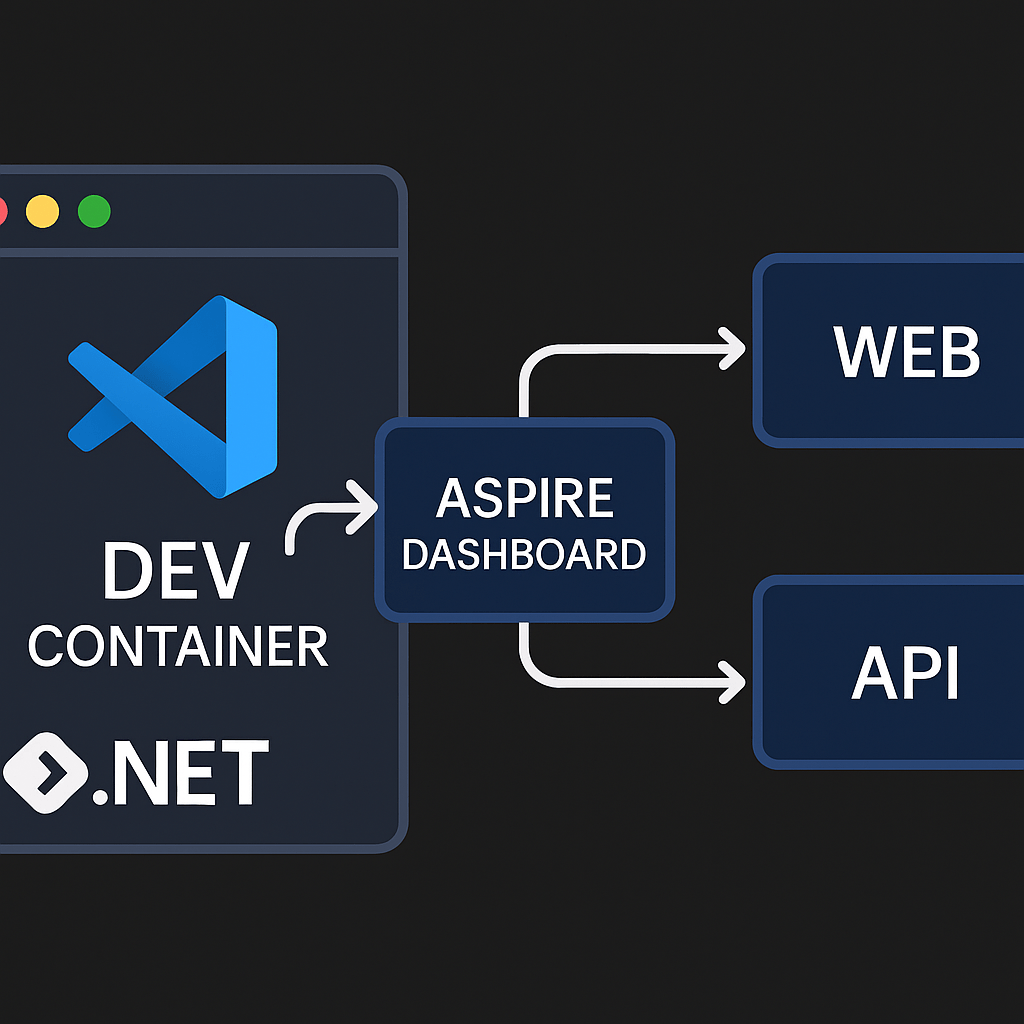
Running .NET Aspire inside a Dev Container gives you a reproducible, fully-tooled environment: Docker, .NET 9 SDK, Aspire CLI, and VS Code extensions—all preconfigured. No more “works on my machine.”
This post shows how to bootstrap an Aspire starter app and wire up a Dev Container so anyone can open the project and hit Run.
1) Create the starter app
dotnet new install Aspire.ProjectTemplates --force
dotnet new aspire-starter -n HelloAspire
You’ll get a solution with:
HelloAspire/
├─ HelloAspire.AppHost/          # Aspire orchestrator
├─ HelloAspire.ApiService/       # Minimal API
├─ HelloAspire.Web/              # Web frontend
├─ HelloAspire.ServiceDefaults/  # Shared defaults
└─ HelloAspire.sln
2) Add a Dev Container
Create .devcontainer/devcontainer.json:
// For format details, see https://aka.ms/devcontainer.json. For config options, see the
// README at: https://github.com/devcontainers/templates/tree/main/src/dotnet
{
  "name": ".NET Aspire",
  "image": "mcr.microsoft.com/devcontainers/dotnet:9.0-bookworm",
  "features": {
    "ghcr.io/devcontainers/features/docker-in-docker:2": {},
    "ghcr.io/devcontainers/features/powershell:1": {}
  },

  "hostRequirements": {
    "cpus": 8,
    "memory": "32gb",
    "storage": "64gb"
  },

  "onCreateCommand": "curl -sSL https://aspire.dev/install.sh | bash",
  "postStartCommand": "dotnet dev-certs https --trust",

  "customizations": {
    "vscode": {
      "extensions": [
        "ms-dotnettools.csdevkit",
        "GitHub.copilot-chat",
        "GitHub.copilot"
      ]
    }
  }
}
What each part does
- Base image:
dotnet:9.0-bookworm→ .NET 9 SDK on Debian Bookworm. - Features
docker-in-docker→ lets Aspire start containers from inside the Dev Container (no host pollution).powershell→ handy for cross-platform scripts.
- hostRequirements → a polite hint for colleagues/CI about recommended resources.
- onCreateCommand → installs the Aspire CLI inside the container.
- postStartCommand → trusts HTTPS dev certs so the Web/API work without browser warnings.
- VS Code extensions → C# Dev Kit + Copilot preinstalled for everyone.
If you prefer to use your host Docker instead of DinD, switch the feature to
docker-outside-of-dockerand mount the socket—this sample keeps it self-contained.
3) Open in the container
In VS Code:
- Ctrl/Cmd+Shift+P → “Dev Containers: Reopen in Container”
- Wait for the first build (image + features + onCreate).
- Terminal inside the container:
dotnet restore
dotnet run --project HelloAspire.AppHost
Open the Aspire Dashboard link from the terminal or VS Code “Ports” panel. You’ll see HelloAspire.ApiService and HelloAspire.Web orchestrated by AppHost.
4) Working in the container
- Debugging: Set
HelloAspire.AppHostas startup, press F5.
C# Dev Kit handles multi-project debug; the Dashboard shows service health. - HTTPS:
postStartCommandhas already trusted dev certs. If your OS prompts, confirm trust once. - Ports: VS Code will auto-forward; check the “Ports” tab if you need to share.
5) Customizing the container
A few useful tweaks:
- Add tools:
"features": {
  "ghcr.io/devcontainers/features/docker-in-docker:2": {},
  "ghcr.io/devcontainers/features/node:1": { "version": "20" },
  "ghcr.io/devcontainers/features/azure-cli:1": {}
}- Pre-install templates or workloads:
"onCreateCommand": "curl -sSL https://aspire.dev/install.sh | bash && dotnet workload restore"- Auto-restore on open:
"postCreateCommand": "dotnet restore"6) Troubleshooting
- Docker can’t start: If DinD fails, ensure your host user is allowed to run nested containers and virtualization is enabled (WSL2/Hyper-V/VT-x).
- Cert trust prompts don’t appear: Run inside container:
dotnet dev-certs https --clean
dotnet dev-certs https --trust- Slow rebuilds: Increase container memory/CPU or enable BuildKit; consider caching NuGet in a mounted volume.
Why Dev Containers for Aspire?
- Zero setup for teammates/CI
- Predictable Docker + .NET + Aspire CLI stack
- Consistent debugging & certificates
- Easy onboarding—clone, reopen, run
With this setup, your Aspire samples run identically on macOS, Windows, and Linux—no local SDK drift or Docker version mismatches.
That’s all folks!
Cheers!
Gašper Rupnik
{End.}

 RaspeR87's Blog
Leave a comment