Ever since I first saw the early discussions around Aspire 13, I couldn’t get the upcoming publishing and deployment changes out of my head. The new pipeline model represents a major step forward in how Aspire applications can be published, packaged, and shipped — especially for teams building containerized solutions or multi-service platforms.
So, I decided to dive in early and see what this means in practice.
Background: What Changed?
In Aspire pre-13, customizing the publish or deployment pipeline required workarounds, since the publish flow was relatively fixed. Modifying or injecting custom logic usually meant hooking into lifecycle events or adding custom tasks in less intuitive places.
With Aspire 13, we now have a first-class pipeline model:
- Pipeline steps can be added and named
- Steps can define dependencies (
dependsOn) and ordering constraints (requiredBy) - The output model is now managed through a Pipeline Output Service
- The pipeline is both easier to read and easier to extend
This was explained extremely well in Safia’s article:
👉 https://blog.safia.rocks/2025/11/03/aspire-pipelines/
Setting Up an Early Preview
Since Aspire 13 is not officially released yet, I installed a daily build of the Aspire CLI and created a fresh project using the template:
aspire update
    - daily

aspire new
    - Blazor & Minimal API starter
I then added the preview pipeline-enabled Docker hosting package:
<PackageReference Include="Aspire.Hosting.Docker"
                  Version="13.1.0-preview.1.25555.14" />
Inside the AppHost project, I configured the app to emit Docker Compose output:
builder.AddDockerComposeEnvironment("env");Then I generated the publish output using the Aspire CLI:
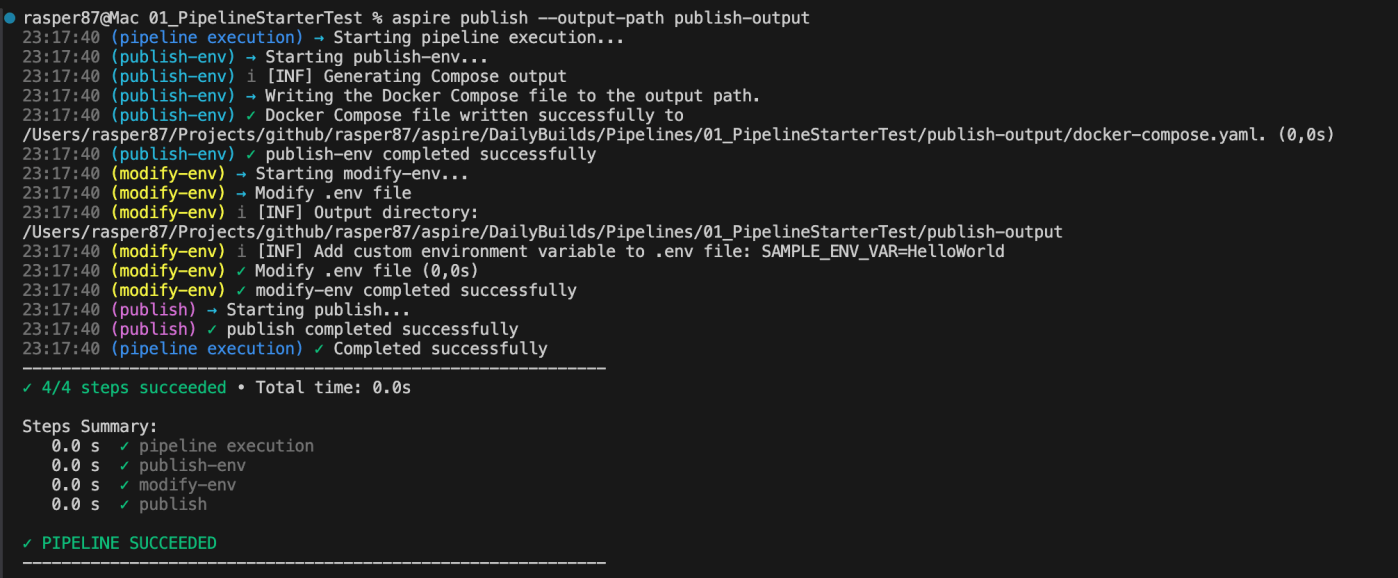
aspire publish --output-path publish-outputThis produced the .env file and docker-compose.yml needed for containerized deployment.
Adding a Custom Pipeline Step
Now to the exciting part: injecting custom behavior into the publish pipeline.
Aspire 13 introduces builder.Pipeline.AddStep(), which lets us add named tasks to the pipeline and control execution order:
builder.Pipeline.AddStep("modify-env", async (context) =>
{
    var modifyEnvFileTask = await context.ReportingStep
        .CreateTaskAsync($"Modify .env file", context.CancellationToken)
        .ConfigureAwait(false);

    await using (modifyEnvFileTask.ConfigureAwait(false))
    {
        var outputService = context.PipelineContext.Services.GetRequiredService<IPipelineOutputService>();
        var outputDirectory = outputService.GetOutputDirectory();
        context.Logger.LogInformation($"Output directory: {outputDirectory}");

        var dotEnvPath = Path.Combine(outputDirectory, ".env");
        List<string> lines = File.Exists(dotEnvPath) ? File.ReadAllLines(dotEnvPath).ToList() : new();

        void Upsert(string key, string val)
        {
            var prefix = key + "=";
            var newLine = prefix + val;
            var index = lines.FindIndex(l => l.StartsWith(prefix, StringComparison.OrdinalIgnoreCase));
            if (index >= 0) lines[index] = newLine; else lines.Add(newLine);
        }

        context.Logger.LogInformation("Add custom environment variable: SAMPLE_ENV_VAR=HelloWorld");
        Upsert("SAMPLE_ENV_VAR", "HelloWorld");

        if (lines.Count == 0 || lines[^1] != "") lines.Add("");
        File.WriteAllLines(dotEnvPath, lines);
    }
}, dependsOn: "publish-env", requiredBy: "publish");
The key part is here:
dependsOn: "publish-env", requiredBy: "publish"This ensures:
| Pipeline Step | Meaning |
|---|---|
publish-env | Must run before our custom step |
modify-env | Runs before the final publish step |
publish | The final execution target |
This dependency model is much clearer and far more reliable than what we had before.

Why This Matters
This is just a small example — adding one variable to .env — but the implications are big:
✅ You can now inject dynamic config during publish
✅ You can programmatically modify Docker Compose before deployment
✅ The pipeline can now handle ordered workflows (finally!)
✅ This unlocks clean extension points for custom deployment targets
For teams building complex multi-service platforms (like mine), this is going to be huge.
Final Thoughts
Aspire 13 isn’t officially out yet, but what’s already available shows a clear direction:
More control, more structure, more extensibility — without sacrificing developer experience.
This is the kind of evolution that quietly unlocks enterprise-ready deployment flows.
I’ll be exploring more over the next days — expect follow-ups.
This journey just started. 🚀
That’s all folks!
Cheers!
Gašper Rupnik
{End.}

 RaspeR87's Blog
Leave a comment