Bringing Back My .NET MAUI Content – Starting With an Older Video (in Slovenian)

A few days ago I realized that although I’ve been actively following .NET MAUI since the very first preview releases, my blog doesn’t really show that story. In the last few years I simply didn’t have enough time to keep this place updated, which means that a lot of MAUI-related content never made it here.

So, let’s start fixing that.

Today I’m sharing a short video I recorded three years ago, back when I was still working in one of my previous companies (not my most recent one). It’s not a deeply technical, developer-oriented presentation, but more of a high-level overview that introduces the platform and what it enables.

Video: https://www.youtube.com/watch?v=WaGi6dnsTTI

Why .NET MAUI matters

.NET MAUI is a cross-platform framework that allows you to build a single application from one shared codebase, and run it on:

  • Windows
  • macOS
  • Linux
  • iOS
  • Android

This means that the same logic, UI structure, and project architecture can power desktop and mobile experiences at the same time.

And if you combine .NET MAUI with Blazor, you push this even further — a single codebase can serve:

  • Desktop apps
  • Mobile apps
  • Web applications

All with shared components, shared UI logic, and shared development patterns.

About the video

Unfortunately, the video is recorded in Slovenian and not in English — sorry to all my non-Slovenian readers — but it still gives a good introductory overview of the concepts, goals, and the direction Microsoft was taking with MAUI at the time.

Even though the video is older, the core ideas remain relevant, and it’s a nice warm-up for all the new MAUI-related content I plan to publish here.

More MAUI content coming soon

I’ve been following .NET MAUI closely from the very beginning, experimenting with previews, RC versions, and release builds. Now that I’m restarting my writing cadence, I’ll finally start sharing more of that knowledge here.

More articles, samples, and insights on .NET MAUI and Blazor Hybrid apps are coming — I promise.

That’s all folks!

Cheers!
Gašper Rupnik

{End.}

Continuing with the Microsoft Agent Framework – Practical Examples 06–10 for Real-World Development

A few weeks ago, I published an article titled
Getting Started with the Microsoft Agent Framework and Azure OpenAI – My First Five .NET 9 Samples,
where I walked through the foundational building blocks of the Agent Framework—basic agents, tool invocation, streaming output, and structured responses.

This article is the direct continuation of that series.

While my current work focuses on much more advanced multi-agent systems—where layered knowledge processing, document pipelines, and context-routing play a crucial role—I still believe that the best way to understand a new technology is through clear, minimal, practical samples.

So in this follow-up, I want to share the next set of examples that helped me understand the deeper capabilities of the framework.
These are Examples 06–10, and they focus on persistence, custom storage, observability, dependency injection, and MCP tool hosting.

Let’s dive in.


Example 06 — Persistent Threads: Saving & Restoring Long-Running Conversations

One of the major strengths of the Microsoft Agent Framework is the ability to maintain conversational state across messages, sessions, and even application restarts.
This is critical if you’re building:

  • personal assistants
  • developer copilots
  • chat interfaces
  • multi-step reasoning chains
  • or anything that needs user-specific memory

In Example 06, the agent:

  1. Starts a new conversation thread
  2. Answers a developer-related question
  3. Serializes the thread using thread.Serialize()
  4. Saves the serialized state to disk (or any storage)
  5. Reloads it later
  6. Resumes the conversation with full continuity

Why this matters:

  • Enables long-lived, multi-turn conversations
  • You can manage per-user memory in your own storage
  • Perfect for web apps, bots, and multi-agent orchestration
  • Unlocks real “assistant-like” behavior

This is the first step toward user-level persistent AI.

Continue reading “Continuing with the Microsoft Agent Framework – Practical Examples 06–10 for Real-World Development”

Exploring the New Aspire 13 Pipeline Model: Customizable, Flexible, and Future-Ready

Ever since I first saw the early discussions around Aspire 13, I couldn’t get the upcoming publishing and deployment changes out of my head. The new pipeline model represents a major step forward in how Aspire applications can be published, packaged, and shipped — especially for teams building containerized solutions or multi-service platforms.

So, I decided to dive in early and see what this means in practice.

Background: What Changed?

In Aspire pre-13, customizing the publish or deployment pipeline required workarounds, since the publish flow was relatively fixed. Modifying or injecting custom logic usually meant hooking into lifecycle events or adding custom tasks in less intuitive places.

With Aspire 13, we now have a first-class pipeline model:

  • Pipeline steps can be added and named
  • Steps can define dependencies (dependsOn) and ordering constraints (requiredBy)
  • The output model is now managed through a Pipeline Output Service
  • The pipeline is both easier to read and easier to extend

This was explained extremely well in Safia’s article:
👉 https://blog.safia.rocks/2025/11/03/aspire-pipelines/

Setting Up an Early Preview

Since Aspire 13 is not officially released yet, I installed a daily build of the Aspire CLI and created a fresh project using the template:

aspire update
    - daily

aspire new
    - Blazor & Minimal API starter

I then added the preview pipeline-enabled Docker hosting package:

<PackageReference Include="Aspire.Hosting.Docker"
                  Version="13.1.0-preview.1.25555.14" />

Inside the AppHost project, I configured the app to emit Docker Compose output:

builder.AddDockerComposeEnvironment("env");

Then I generated the publish output using the Aspire CLI:

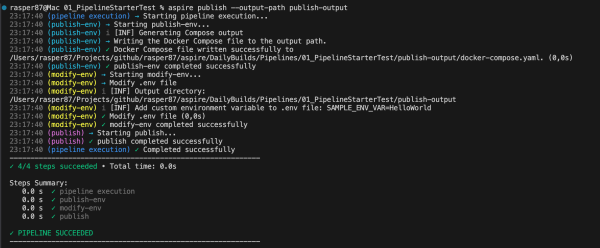
aspire publish --output-path publish-output

This produced the .env file and docker-compose.yml needed for containerized deployment.

Continue reading “Exploring the New Aspire 13 Pipeline Model: Customizable, Flexible, and Future-Ready”

.NET Aspire — Custom Publish & Deployment Pipelines

Aspire separates publish (generate parameterized artifacts) from deploy (apply to an environment). With a tiny bit of code, you can hook into the publish pipeline, prompt for the target environment (dev/staging/prod), and stamp Docker image tags + .env accordingly—perfect for local packaging and CI pipelines.

Why this matters

Out-of-the-box, Aspire can publish for Docker, Kubernetes, and Azure. The aspire publish command generates portable, parameterized assets (e.g., Docker Compose + .env); aspire deploy then resolves parameters and applies changes—when the selected integration supports it. For Docker/Kubernetes, you typically publish and then deploy via your own tooling (Compose, kubectl, GitOps). Azure integrations (preview) add first-class deploy.

Supported targets (at a glance)

  • Docker / Docker Compose → Publish ✅, Deploy ❌ (use generated Compose with your scripts).
  • Kubernetes → Publish ✅, Deploy ❌ (apply with kubectl/GitOps).
  • Azure Container Apps / App Service → Publish ✅, Deploy ✅ (Preview).

The workflow in practice

1. Generate artifacts

aspire publish -o artifacts/

For Docker, you’ll get artifacts/docker-compose.yml plus a parameterized .env.

2. Run those artifacts (Docker example)

docker compose -f artifacts/docker-compose.yml up --build

Provide required variables (shell export/.env/CI variables) before you run.

3. Or use aspire deploy when the integration supports it (Azure preview).

What Microsoft documents (and what they don’t)

Microsoft’s overview explains publish vs. deploy, the support matrix, and that artifacts contain placeholders intentionally—values are resolved later. The extensibility story (custom callbacks/annotations) exists but is thin; you’ll often reach for PublishingCallbackAnnotation / DeployingCallbackAnnotation to inject your own steps. This post shows one concrete, production-useful example.

Continue reading “.NET Aspire — Custom Publish & Deployment Pipelines”

Building a .NET AI Chat App with Microsoft Agent Framework and Aspire Orchestration

Creating a fully functional AI Chat App today doesn’t have to take weeks.
With the new Microsoft Agent Framework and .NET Aspire orchestration, you can set up a complete, observable, and extensible AI solution in just a few minutes — all running locally, with built-in monitoring and Azure OpenAI integration.

If you’ve experimented with modern chat applications, you’ve probably noticed they all share a similar design.
So instead of reinventing the wheel, we’ll leverage the elegant Blazor-based front end included in Microsoft’s AI templates — and focus our energy where it matters most: the intelligence and orchestration behind it.

But where things get truly exciting is behind the scenes — where you can move from a simple chat client to a structured, observable AI system powered by Microsoft Agent Framework and .NET Aspire orchestration.

Why Use the Agent Framework?

The Microsoft Agent Framework brings much-needed architectural depth to your AI solutions. It gives you:

  • Separation of concerns – keep logic and tools outside UI components
  • Testability – verify agent reasoning and tool behavior independently
  • Advanced reasoning – support for multi-step decision flows
  • Agent orchestration – easily coordinate multiple specialized agents
  • Deep observability – gain insight into every AI operation and decision

Essentially, it lets you transform a plain chat app into an intelligent, composable system.

Why .NET Aspire Makes It Even Better

One of the best parts about using the AI templates is that everything runs through .NET Aspire.
That gives you:

  • Service discovery between components
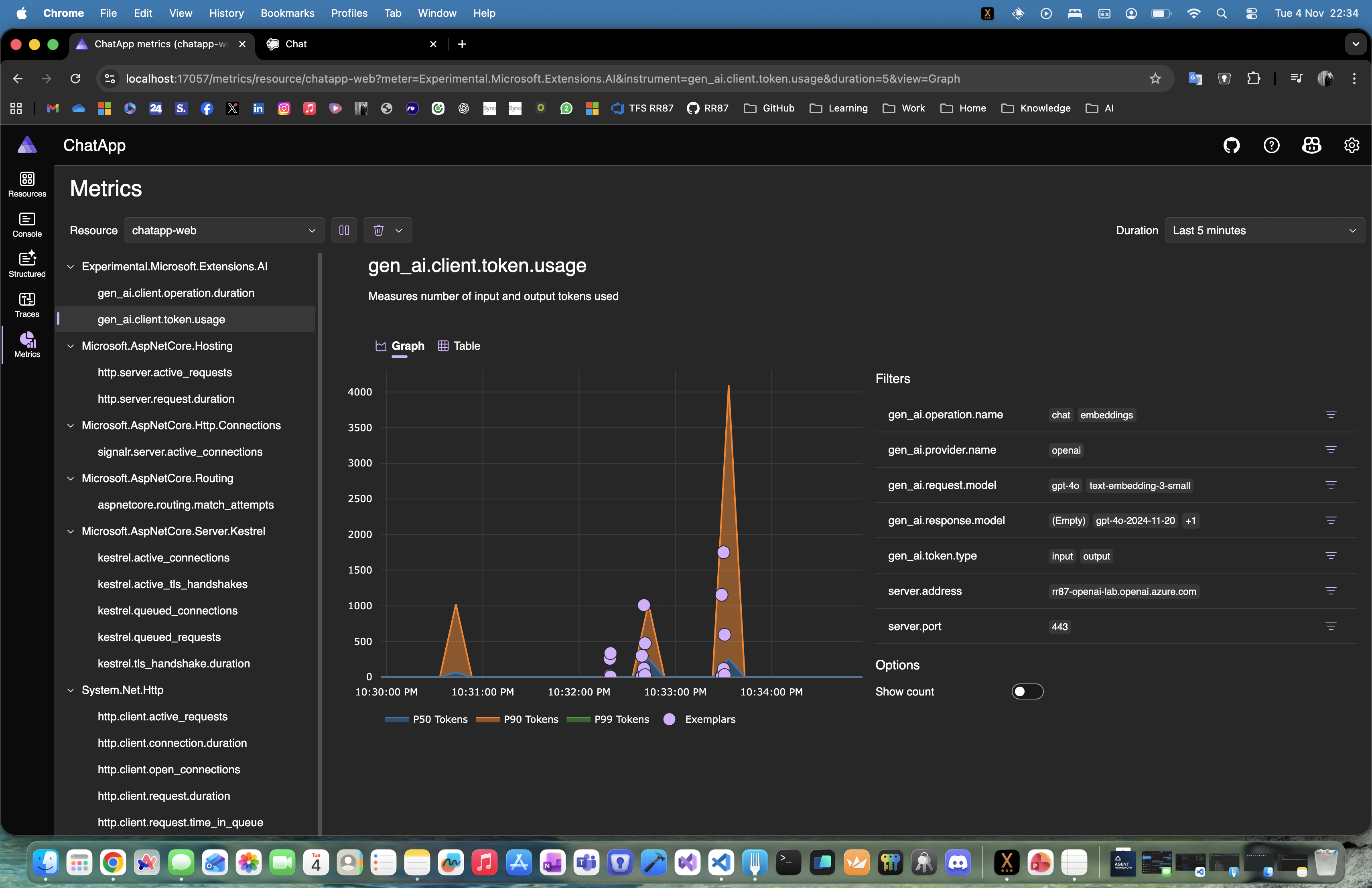
  • Unified logging and telemetry in the Aspire dashboard
  • Health checks for every service
  • Centralized configuration for secrets, environment variables, and connection settings

With Aspire, you get orchestration, observability, and consistency across your entire local or cloud-ready environment — no extra setup required.

Continue reading “Building a .NET AI Chat App with Microsoft Agent Framework and Aspire Orchestration”

Getting Started with the Microsoft Agent Framework and Azure OpenAI – My First Five .NET 9 Samples

Over the last few days, I’ve been exploring Microsoft’s new Agent Framework, a preview library that brings structured, context-aware AI capabilities directly into .NET applications.
To get familiar with its architecture and basic features, I’ve built five small “Getting Started” console samples in .NET 9, all powered by Azure OpenAI and defined via a simple .env configuration.

Each example builds upon the previous one — from a simple agent call to multi-turn conversations, function tools, approvals, and structured object outputs.

01 – SimpleAgent

The most basic example: connecting to Azure OpenAI using AzureKeyCredential, creating a simple AIAgent, and asking a question.

AIAgent agent = new AzureOpenAIClient(
    new Uri(endpoint),
    new AzureKeyCredential(key))
    .GetChatClient(deployment)
    .CreateAIAgent(instructions: "Tell me which language is most popular for development.", name: "Developer Assistant");

Console.WriteLine(await agent.RunAsync("Tell me which language is most popular for development."));

02 – ThreadAgent

Introduces multi-turn conversation threads that preserve context between user messages.

AgentThread thread = agent.GetNewThread();
Console.WriteLine(await agent.RunAsync("Tell me which language is most popular for development.", thread));
Console.WriteLine(await agent.RunAsync("Now tell me which of them to use if I want to build a web application in Microsoft ecosystem.", thread));

03 – FunctionTool

Shows how to extend the agent with function tools (custom methods) that can be invoked automatically by the AI when relevant.

[Description("Talk about dogs and provide interesting facts, tips, or stories.")]
static string TalkAboutDogs(string topic) =>
    topic.ToLower() switch
    {
        "labrador" => "Labradors are friendly and full of energy.",
        "poodle" => "Poodles are smart and hypoallergenic.",
        _ => $"Dogs are amazing companions! 🐶"
    };

var agent = new AzureOpenAIClient(new Uri(endpoint), new AzureKeyCredential(key))
    .GetChatClient(deployment)
    .CreateAIAgent("You are a funny assistant who loves dogs.",
                   tools: [AIFunctionFactory.Create(TalkAboutDogs)]);
Continue reading “Getting Started with the Microsoft Agent Framework and Azure OpenAI – My First Five .NET 9 Samples”

.NET Aspire — From Local Development to Global Connectivity

At this year’s NTK 2025 conference, I had the opportunity to present a session titled
“.NET Aspire: od A do Ž — od lokalnega razvoja do povezave s svetom.”

The talk explored how .NET Aspire simplifies building, running, and observing distributed applications — from local development and debugging to real-world deployments.

What We Covered

  • What .NET Aspire really is — a collection of templates, tools, and packages for building observable, production-ready distributed apps.
  • The role of AppHost, ServiceDefaults, and the Aspire Dashboard.
  • How Aspire differs from (and improves on) traditional Docker Compose setups.
  • How to run multi-service apps, manage environments, configure dependencies, and observe everything in one place.
  • How Aspire integrates seamlessly with AI models, databases, Redis, Python, and more.

Demo Repository

All examples and demos from the session are publicly available on GitHub:
👉 github.com/RaspeR87/aspire/tree/main/NT2025

You’ll find complete Aspire-based scenarios — from simple orchestration samples to complex multi-service setups with observability and AI integrations.

About the Talk

The slides are available here:
📑 NTK 2025 — .NET Aspire od A do Ž

Thanks to everyone who joined the session!
If you’re experimenting with Aspire, feel free to fork the demos, adapt them for your own environment, and share your experiences.

That’s all folks!

Cheers!
Gašper Rupnik

{End.}

Running Keycloak with Observability and Multi-App Orchestration in .NET Aspire

This post walks through how to orchestrate Keycloak, Platform, and Portal applications using .NET Aspire — complete with OpenTelemetry integration, configurable RUN_MODE, and a flexible multi-project structure that scales from infra-only to a full stack.

1. Setting up the Infra layer

Start by preparing your .NET and Aspire projects:

# Set SDK version
dotnet new globaljson --sdk-version 9.0.304

# Aspire orchestration projects
dotnet new aspire-apphost -n AppHost -o infra/aspire/AppHost -f net9.0
dotnet new aspire-servicedefaults -n ServiceDefaults -o infra/aspire/ServiceDefaults -f net9.0

2. Backend services

We’ll define two web APIs — Platform and Portal — both using shared authentication logic via Keycloak.

dotnet new webapi -n Platform -o services/backend/Platform -f net9.0 --use-controllers
dotnet new webapi -n Portal   -o services/backend/Portal   -f net9.0 --use-controllers

dotnet add services/backend/Platform/Platform.csproj reference infra/aspire/ServiceDefaults/ServiceDefaults.csproj
dotnet add services/backend/Portal/Portal.csproj   reference infra/aspire/ServiceDefaults/ServiceDefaults.csproj

dotnet add infra/aspire/AppHost/AppHost.csproj reference services/backend/Platform/Platform.csproj
dotnet add infra/aspire/AppHost/AppHost.csproj reference services/backend/Portal/Portal.csproj

# Shared authentication library
mkdir -p services/backend/_shared/Common.Auth
dotnet new classlib -n Common.Auth -f net9.0 -o services/backend/_shared/Common.Auth
dotnet add services/backend/Platform/Platform.csproj reference services/backend/_shared/Common.Auth/Common.Auth.csproj
dotnet add services/backend/Portal/Portal.csproj   reference services/backend/_shared/Common.Auth/Common.Auth.csproj

3. RUN_MODE: controlling what to launch

Your RUN_MODE variable defines which part of the system Aspire starts.
Examples:

ModeDescription
infra-onlyOnly observability + databases + Keycloak
platform:bePlatform backend only
platform:be+fePlatform backend + frontend
platform:be,portal:be+fePlatform backend + Portal stack
platform:be+fe,portal:be+feFull stack
Continue reading “Running Keycloak with Observability and Multi-App Orchestration in .NET Aspire”

Building an AI Chat app with .NET Aspire, Ollama/OpenAI, Postgres, and Redis

With .NET Aspire, you can orchestrate a full AI chat system — backend, model, data store, and frontend — from one place.
This sample shows how Aspire can manage a large language model (LLM), a Postgres conversation database, a Redis message broker, and a React-based chat UI, all within a single orchestration file.

Folder layout

11_AIChat/
├─ AppHost/ # Aspire orchestration
├─ ChatApi/ # .NET 9 backend API (SignalR + EF)
├─ chatui/ # React + Vite frontend
├─ ServiceDefaults/ # shared settings (logging, health, OTEL)
└─ README.md

Overview

This example demonstrates:

  • AI model orchestration with local Ollama or hosted OpenAI
  • Postgres database for conversation history
  • Redis for live chat streaming and cancellation coordination
  • Chat API using ASP.NET Core + SignalR
  • React/Vite frontend for real-time conversations
  • Full Docker Compose publishing via Aspire

The AppHost (orchestration)

AppHost/Program.cs

var builder = DistributedApplication.CreateBuilder(args);

// Publish this as a Docker Compose application
builder.AddDockerComposeEnvironment("env")
       .WithDashboard(db => db.WithHostPort(8085))
       .ConfigureComposeFile(file =>
       {
           file.Name = "aspire-ai-chat";
       });

// The AI model definition
var model = builder.AddAIModel("llm");

if (OperatingSystem.IsMacOS())
{
    model.AsOpenAI("gpt-4o-mini");
}
else
{
    model.RunAsOllama("phi4", c =>
    {
        c.WithGPUSupport();
        c.WithLifetime(ContainerLifetime.Persistent);
    })
    .PublishAsOpenAI("gpt-4o-mini");
}

// Postgres for conversation history
var pgPassword = builder.AddParameter("pg-password", secret: true);

var db = builder.AddPostgres("pg", password: pgPassword)
                .WithDataVolume(builder.ExecutionContext.IsPublishMode ? "pgvolume" : null)
                .WithPgAdmin()
                .AddDatabase("conversations");

// Redis for message streams + coordination
var cache = builder.AddRedis("cache").WithRedisInsight();

// Chat API service
var chatapi = builder.AddProject<Projects.ChatApi>("chatapi")
                     .WithReference(model).WaitFor(model)
                     .WithReference(db).WaitFor(db)
                     .WithReference(cache).WaitFor(cache);

// Frontend served via Vite
builder.AddNpmApp("chatui", "../chatui")
       .WithNpmPackageInstallation()
       .WithHttpEndpoint(env: "PORT")
       .WithReverseProxy(chatapi.GetEndpoint("http"))
       .WithExternalHttpEndpoints()
       .WithOtlpExporter()
       .WithEnvironment("BROWSER", "none");

builder.Build().Run();
Continue reading “Building an AI Chat app with .NET Aspire, Ollama/OpenAI, Postgres, and Redis”

Processing Azure Service Bus messages locally with .NET Aspire

You don’t need a cloud namespace to prototype a queue-driven worker. With .NET Aspire, you can spin up an Azure Service Bus emulator, wire a Worker Service to a queue, and monitor it all from the Aspire dashboard—no external dependencies.

This post shows a minimal setup:

  • Aspire AppHost that runs the Service Bus emulator
  • A queue (my-queue) + a dead-letter queue
  • A Worker Service that consumes messages
  • Built-in enqueue commands to test locally

Folder layout

10_AzureServiceBus/
├─ AppHost/ # Aspire orchestration
├─ ServiceDefaults/ # shared logging, health, etc.
├─ WorkerService/ # background processor
└─ README.md

To create it:

dotnet new worker -n WorkerService
dotnet new aspire-apphost -n AppHost
dotnet new aspire-servicedefaults -n ServiceDefaults

AppHost: Service Bus emulator + queues

var builder = DistributedApplication.CreateBuilder(args);

// Add Azure Service Bus
var serviceBus = builder.AddAzureServiceBus("servicebus")
                        .RunAsEmulator(e => e.WithLifetime(ContainerLifetime.Persistent))
                        .WithCommands();

var serviceBusQueue = serviceBus.AddServiceBusQueue("my-queue");
serviceBus.AddServiceBusQueue("dead-letter-queue");

// Add the worker and reference the queue
builder.AddProject<Projects.WorkerService>("workerservice")
    .WithReference(serviceBusQueue)
    .WaitFor(serviceBusQueue);

builder. Build().Run();
Continue reading “Processing Azure Service Bus messages locally with .NET Aspire”

Website Powered by WordPress.com.

Up ↑