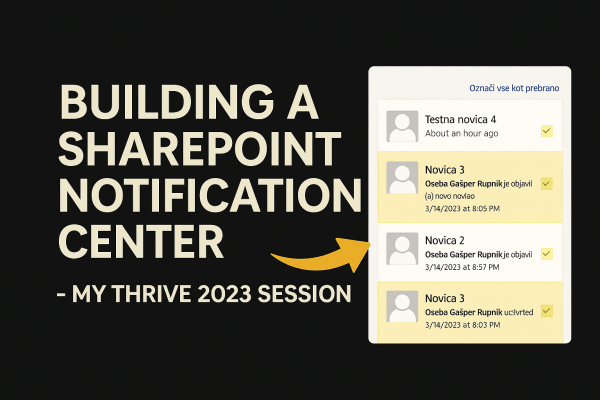
Building a Custom Notification Center for SharePoint On-Prem – My Thrive 2023 Session

At Thrive Conference 2023, I delivered a session focused on something I’ve been working with for over 15 years: SharePoint On-Premises.
Specifically, I presented how to build a modern, unified Notification Center that brings SharePoint alerts into the modern world—similar to notification models users know from Facebook, LinkedIn, Twitter, Teams, and other platforms.

This solution is not a workaround or enhancement of “Alert Me.”
It is a complete three-step architecture, built specifically for SharePoint On-Prem environments where modern cloud features are not available.

All content in this post comes directly from the session’s slides.
📑 Slides: https://rasper87.blog/wp-content/uploads/2025/11/spnotificationcenter_thrive2023.pdf


Why a Custom Notification Center?

SharePoint’s built-in Alert Me feature is simple, but limited:

  • Users must manually turn it on
  • Notifications arrive only via email or SMS
  • Emails are often ignored
  • The look & feel is outdated
  • No unified overview of activities across the portal

Modern intranets need something more:

  • Centralized
  • Non-intrusive
  • Always visible
  • Configurable
  • Secure
  • And ideally: looks and behaves like notifications in social networks

This is exactly what the Notification Center provides.

Continue reading “Building a Custom Notification Center for SharePoint On-Prem – My Thrive 2023 Session”

Web/Site Templates in SharePoint Online Modern Pages? No problem.

Let’s imagine that we want to have site template with predefined design, sections, web parts on it, lists with additional fields, custom page settings etc. etc.

If you are familiar with SharePoint On-Prem versions there we have Site Definitions and Web Templates for stuff like this. But what can we do now in SharePoint Modern Sites times in a combination with SharePoint Online?

We have to learn something new – there we have Site Scripts and Site Designs for some specific common steps in creation process of our Web/Site Templates. What you could do with Site Scripts you could see on that link.
But scope of modifying with Site Scripts is a lil’bit small, so we have to take a look into alternatives.

In SharePoint world we have SharePoint PowerShell modules – so we could use PowerShell to modify our Modern Pages in SharePoint Online. But we want to make this happen automatically when new Web/Site was created -> so we want to make this happen with Web/Site Template.
That is possible only with Site Scripts and Site Designs. Fortunately we could connect our PowerShell scripts with Site Scripts and Site Designs via Microsoft Flow, which could call Azure Function App which contains PowerShell script.

But PnP team go further with PnP Provisioning Engine in their PnP PowerShell modules where you could easly specify Web/Site Template in one XML file and put it into your PowerShell script which is called from Site Scripts via Flow.

Let’s take a look into a simple example.

Continue reading “Web/Site Templates in SharePoint Online Modern Pages? No problem.”

Anonymous CreateTerm leads to UnauthorizedAccessException and ArgumentNullException

Today is time for new post, new hack inside of SharePoint environment 🙂

Let’s imagine that we want to create new Term inside of specific Term Set within specific Term Store. But we want to create it as anonymous user, because we want to make this functionality available inside of some public page without login needs.

We could make this possible with code which runs inside of RunWithElevatedPrivileges scope. But creating term process differs from other creating processes inside of SharePoint (list item creation, file upload etc.).

Let’s take a look to this topic.

Continue reading “Anonymous CreateTerm leads to UnauthorizedAccessException and ArgumentNullException”

Working with Comments on SharePoint 2019 Modern Pages

With SharePoint 2019 we get new Modern Pages. With Modern Pages we get completely renewed Comments feature which looks like that example on image above.

On SharePoint 2019 you could currently use only Comments without Like and Views feature as on SharePoint Online (image below).

There is a new Comment REST API from where you could read / write comments for specific page and it is available on SharePoint 2019 and SharePoint Online. More about that you could read in that blog post from @vrdmn.

What I want to show you today is how you could programmatically read this comments from SharePoint SSOM.

Continue reading “Working with Comments on SharePoint 2019 Modern Pages”

Read user information from Skype for Business Online with Azure Function App

Let’s imagine that we want to create Address Book SPFx Web Part in which we want to have option to find and show details of our coworkers.

If you want to build it from scratch, you could choose TextField and DetailsList from Office Fabric UI. First for search box and second for showing results as you could see above.

But let’s take a look behind-scene – how we could search users from Azure AD and how could we get some of their additional information.

Continue reading “Read user information from Skype for Business Online with Azure Function App”

XsltListViewWebParts with Paging problem or SaveChanges error

Let’s imagine, that we want to have SharePoint Library Template with more than 90 Views.

We want to define this views inside of List Schema.xml file because this is the easiest way for fast provisioning of SharePoint lists and their views. But there is the limit – List definition in Schema.xml file could contains max 90 views!

So we have to choose another way – we could define this views “by code”. We could make just few common views by Schema.xml and other could be copied from them with list.SaveAsNewView() function from SharePoint SSOM and then we could modify it by code.

After that we want to add this list views to some pages at SharePoint. Default views, made inside of Schema.xml could be added to page “by xml” with XsltListViewWebPart where we have to define BaseViewID for each view.

But views, created “by code” could be added into pages “by code” too. And here we could have problems with some SharePoint versions.

Continue reading “XsltListViewWebParts with Paging problem or SaveChanges error”

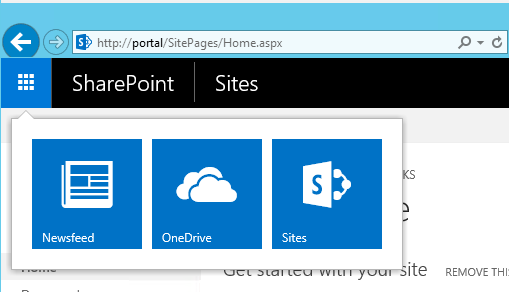
O365 SharePoint Suitenav: Add custom button

Today I want to show you, how you could add custom button to the right side of top Office 365 SharePoint SuiteNav / SuiteBar like in an image above.

For this suitenav we don’t have any official way in SharePoint 2016 like we have at SharePoint 2013 with SuiteLinks Delegate Controls.
Officially you could add only custom tiles on your App Launcher to the left side of SuiteNav named App Launcher Tiles – but only with SharePoint 2016 Feature Pack 1.

So we have to go in own way. I want to share with you how I have done this with JavaScript and a lil’bit hacking.
Just for information -> suitenav links are officially created with JavaScipt too.

Continue reading “O365 SharePoint Suitenav: Add custom button”

SPFx and Microsoft Bot – Starting point

Today I want to share with you something new within my blog – Microsoft Bot Framework.

And because I love SharePoint and I work with it for a while, SharePoint Framework (SPFx) and MS Bot Framework is my way to start this journey.

As anything in this world is mandatory to begin with starting point. And here we are – how we could start using Microsoft Bot Framework inside of our SharePoint Framework (SPFx) and create HelloWorld-like example in Bot Framework?

Continue reading “SPFx and Microsoft Bot – Starting point”

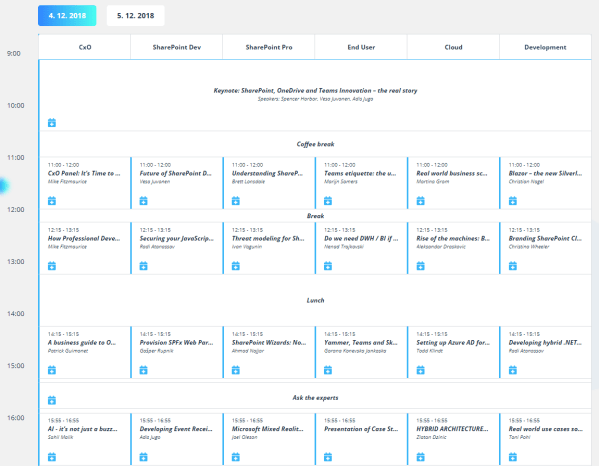
Schedule Web Part in SharePoint Framework

Today I want to show you how easy you could create Schedule Web Part in SharePoint Framework.

I took Schedule Template from CodyHouse, rewrite & extent it into a TypeScript language, put it into class named SchedulePlan inside of SchedulePlan.tsx file and used it inside of my test schedule-webpart SPFx project.

This web part, visually branded by my co-worker, was used for Thrive Conference organized by us @ Kompas Xnet, December 4-5, 2018 – Ljubljana, Slovenia.

Continue reading “Schedule Web Part in SharePoint Framework”

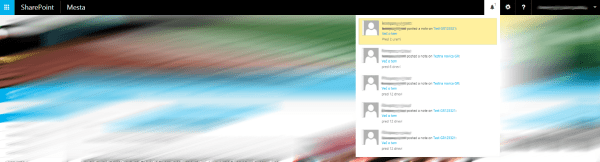
Notification Center inside of SharePoint On-Prem

Sometimes my activities information on mysites are not as important for me because I know what I did on SharePoint portal in past few days.

Instead of that I need Notification Center functionality on SharePoint as we have it on any other social portals like Facebook, Twitter, Instagram etc.
I need in-time information about who wrote comment to my article, my video, my gallery etc.

So I made this functionality available for SharePoint On-Prem few weeks ago and in article below you could find in which way I made this.

Continue reading “Notification Center inside of SharePoint On-Prem”

Website Powered by WordPress.com.

Up ↑