Dynamic External JS References in SPFx Web Parts

Hello everybody!

Today I want to show you my solution how you could make dynamic external references to JS files in SPFx Web Parts.

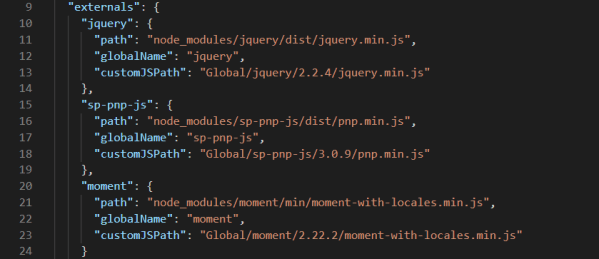
I’m pretty sure that you already know externals property from config.json file of your SPFx Web Parts. It is supposed to be for referencing external JS libraries from your SPFx Web Parts.

By default, the web part bundler automatically includes any library that is a dependency of the web part module. This means that the library is deployed in the same JavaScript bundle file as your web part. This is more useful for smaller libraries that are not used in multiple web parts.

But in real world you always have to create more than just one web part. So you want to have your JS libraries externally and you want to have it in your local CDN, which is for example not the same for test and production environment.

I’ve done this with modifying default GULP Tasks Definition File of SPFx Web Part.

Let’s take a look. Continue reading “Dynamic External JS References in SPFx Web Parts”

Custom SharePoint Survey Template with Multi-Language Support

Today I want to show you how you could create Custom SharePoint Survey Template from default SharePoint Survey Template with TemplateType=”102″.

Let’s imagine that we want to create custom SharePoint Survery Template for Quick Poll. We want to allow just one question with one type of answers – Radio Buttons. And we want to have multi-language UI where Survey Admin could define question and answers in two language (English – EN and Slovenian – SI) as you can see in featured image above. Continue reading “Custom SharePoint Survey Template with Multi-Language Support”

MS Graph and SPFx [Global Office 365 Dev Bootcamp Session]

Today I want to share with you my presentation and demo examples from my session at Global Office 365 Developer Bootcamp @ Ljubljana, Slovenia last Saturday.

I talked about Microsoft Graph globally and how to connect to MS Graph from SPFx deeply. At the end I showed how could we connect to MS Graph from other platforms like Microsoft Flow or C# code as Outlook Add-In.

In six demo examples you could see how to retrieve User informations from Microsoft Graph, how to use Microsoft Graph TypeScript Types, how to retrieve Mail and Calendar informations, how to Send Email via Graph, how to read user Tasks from Planner and how to read specific Site and Content Types informations from SharePoint or how to Upload File to SharePoint from SPFx Web Part via Graph API.

Continue reading “MS Graph and SPFx [Global Office 365 Dev Bootcamp Session]”

Using ListPeoplePicker from Office UI Fabric

Hello folks. I’m on vacation but my WordPress write for me this blog post anyway 😀 .

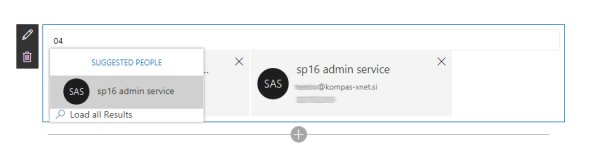
We will create SPFx Web Part which can be used as Address Book for our Company Employees.

In Office UI Fabric we have PeoplePicker Component which has a lot of different variations. One of them and I think the best option for Address Book is ListPeoplePicker which I want to show you today deeply in this blog post because it isn’t as much documented as you wish. Continue reading “Using ListPeoplePicker from Office UI Fabric”

Office UI Fabric Persona with Skype for Business status integration

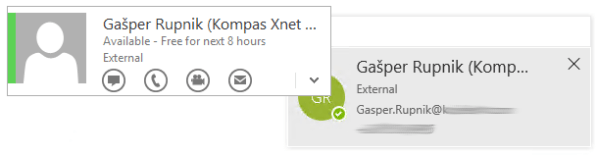
Today I want to show you simple SPFx Web Part solution, how you could connect new Office UI Fabric React component named Persona with status from Skype for Business (Lync).

Persona is used for rendering an individual’s avatar, user information and presence.
We will use Name.NameCtrl ActiveX component to get presence status of each person from Skype for Business. This ActiveX component was written by Microsoft and works only on IE because it use NPAPI plugins which are disabled in Chrome since 1 Sep 2015. Continue reading “Office UI Fabric Persona with Skype for Business status integration”

Custom CreatePublishingPageDialog in SharePoint? No problem!

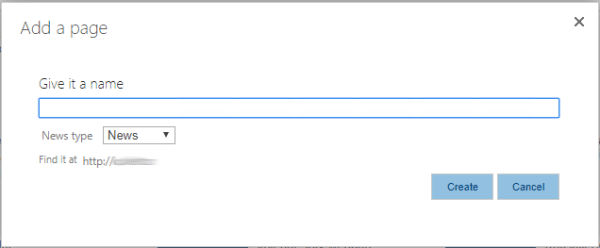
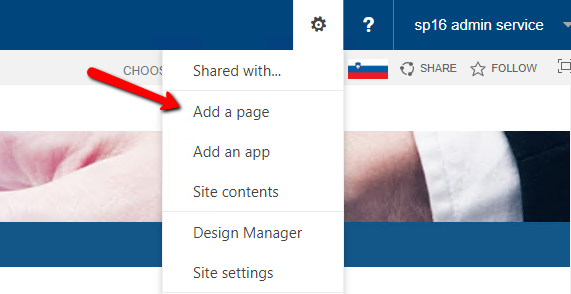
Let’s imagine that we have multiple types of articles with multiple page layouts and we want to call Add a page dialog for each of them.

2018-07-19_1230

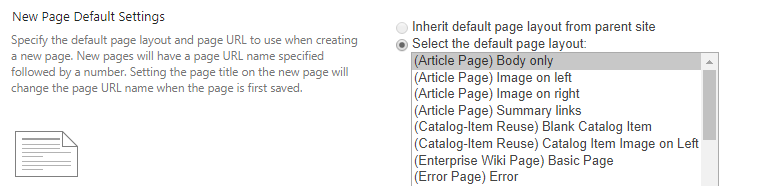
The problem is in SharePoint OOTB CreatePublishingPageDialog.aspx page which is called when you choose Add a page from Site Actions menu. With this one you could create just one type (content type) of article at the time with specific page layout. It is defined in Site Settings under Page layouts and site templates within Look and Feel category.

2018-07-19_1236

One of the solutions is to create custom CreatePublishingPageDialog.aspx page. Continue reading “Custom CreatePublishingPageDialog in SharePoint? No problem!”

Loading dependent JS files (e.g. JQuery Plugins) into SPFx Solution in right order

Today I want to show you quick solution how you could load multiple dependent JS files into your SPFx Solution (in my example SPFx Web Part) in right order.

Lets imagine that we have to make simple Weather SPFx Web Part. We decided to use JQuery plugin named SimpleWeather which is based / it depends on JQuery. If you want your Web Part to work normally at each loading time you have to take care on loading order of your external JS script files. Continue reading “Loading dependent JS files (e.g. JQuery Plugins) into SPFx Solution in right order”

Provision SPFx Web Parts to Classic Sites – Part 5 (additional): Run all SPFx Gulp tasks with one custom PowerShell function

After weeks full of conferences (SharePoint Conference North America and Collaboration Summit Mainz) its time to go back to work and here is additional post for collection of blog posts how you could make provisioning of SPFx Web Parts to Classic SharePoint Sites inside of your WSP solution package:

  1. Include SPFx Assets & Package inside of WSP
  2. Deploy SPFx Web Part to SharePoint Server 2016 App Catalog with WSP
  3. Install SPFx Web Part to SharePoint Site/Web
  4. Include SPFx Web Part inside of Web Template
  5. Run all SPFx Gulp tasks with one custom PowerShell function (this blog post) [additional]

The idea is to run all these gulp tasks for deploying and packaging your SPFx Web Parts to WSP solution with one command.

gulp bundle --ship --copytowsp --target-cdn http://sp2016/sites/appcatalog/SPFxAssets
gulp copyassetstowsp
gulp package-solution --ship
gulp copypackagetowsp

And if we have more than one SPFx Web Parts we have to repeat this tasks multiple times. Continue reading “Provision SPFx Web Parts to Classic Sites – Part 5 (additional): Run all SPFx Gulp tasks with one custom PowerShell function”

Detect text language from files in SharePoint with AI and Flow

In a correlation with my previous blog post I want to share with you solution how you could detect text language from files in SharePoint Document Library. All can be done with help of Microsoft FlowText Analytics API and Azure Functions.

After language detection you want to save language name (English, Slovenian etc.) to one of Managed Metadata Field named Language. Because there we have Terms, you have to define it in format “Name|Guid”. I used Azure Functions to get Term Guid from Name with help of TaxonomySession from Microsoft.SharePoint.Client.Taxonomy library. Continue reading “Detect text language from files in SharePoint with AI and Flow”

Website Powered by WordPress.com.

Up ↑