Ever since I first saw the early discussions around Aspire 13, I couldn’t get the upcoming publishing and deployment changes out of my head. The new pipeline model represents a major step forward in how Aspire applications can be published, packaged, and shipped — especially for teams building containerized solutions or multi-service platforms.
So, I decided to dive in early and see what this means in practice.
Background: What Changed?
In Aspire pre-13, customizing the publish or deployment pipeline required workarounds, since the publish flow was relatively fixed. Modifying or injecting custom logic usually meant hooking into lifecycle events or adding custom tasks in less intuitive places.
With Aspire 13, we now have a first-class pipeline model:
- Pipeline steps can be added and named
- Steps can define dependencies (
dependsOn) and ordering constraints (requiredBy) - The output model is now managed through a Pipeline Output Service
- The pipeline is both easier to read and easier to extend
This was explained extremely well in Safia’s article:
👉 https://blog.safia.rocks/2025/11/03/aspire-pipelines/
Setting Up an Early Preview
Since Aspire 13 is not officially released yet, I installed a daily build of the Aspire CLI and created a fresh project using the template:
aspire update
    - daily

aspire new
    - Blazor & Minimal API starter
I then added the preview pipeline-enabled Docker hosting package:
<PackageReference Include="Aspire.Hosting.Docker"
                  Version="13.1.0-preview.1.25555.14" />
Inside the AppHost project, I configured the app to emit Docker Compose output:
builder.AddDockerComposeEnvironment("env");Then I generated the publish output using the Aspire CLI:
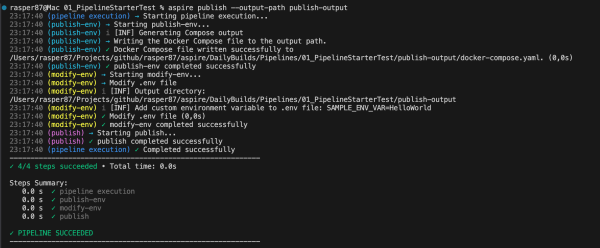
aspire publish --output-path publish-outputThis produced the .env file and docker-compose.yml needed for containerized deployment.

 RaspeR87's Blog