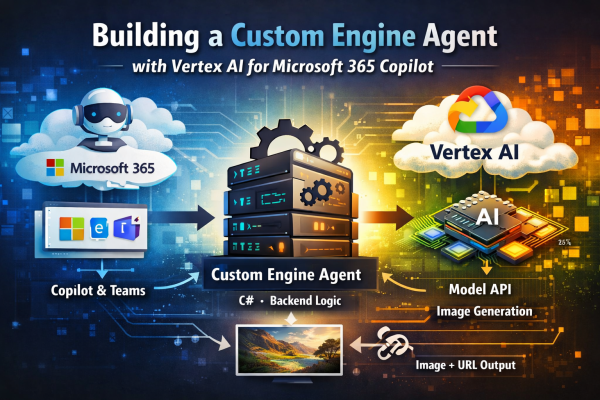
Building a Custom Engine Agent with Vertex AI for Microsoft 365 Copilot

How to design a backend-owned Copilot agent and integrate Google Vertex AI cleanly across cloud boundaries.


Introduction

Extending Microsoft 365 Copilot often starts with declarative agents or lightweight plugins. That works well—until you need full control.

In this project, the goal was different:

  • keep orchestration inside a backend we fully own
  • integrate an external model provider (Google Vertex AI)
  • expose the result through Microsoft 365 surfaces like Teams and Copilot

This led to a Custom Engine Agent architecture, where:

Microsoft handles the channel.
Your backend owns the behavior.

This article focuses on two key areas:

  • how to structure a Custom Engine Agent properly
  • how to integrate Vertex AI as a first-class backend component

Why a Custom Engine Agent?

Instead of a declarative setup, the system is built as a backend-driven agent that can:

  • accept activities from Teams or Copilot
  • orchestrate prompt preparation in C#
  • call Vertex AI directly
  • persist generated assets and metadata
  • expose public download URLs
  • evolve independently of Microsoft 365 packaging

The key architectural decision:

Keep Microsoft 365 at the boundary — everything else is regular backend code.


High-Level Architecture

Copilot / Teams
Custom Engine Agent host (Microsoft Agents SDK)
Agent (activity → domain translation)
Engine (use case logic)
Orchestrator (prompt preparation)
Vertex AI client
Storage (assets + metadata)
Response (image + URL)

Key design rule

  • Host → thin
  • Agent → channel-aware
  • Engine → business logic
  • Vertex client → provider integration
Continue reading “Building a Custom Engine Agent with Vertex AI for Microsoft 365 Copilot”

Getting Started with the Microsoft Agent Framework and Azure OpenAI – My First Five .NET 9 Samples

Over the last few days, I’ve been exploring Microsoft’s new Agent Framework, a preview library that brings structured, context-aware AI capabilities directly into .NET applications.
To get familiar with its architecture and basic features, I’ve built five small “Getting Started” console samples in .NET 9, all powered by Azure OpenAI and defined via a simple .env configuration.

Each example builds upon the previous one — from a simple agent call to multi-turn conversations, function tools, approvals, and structured object outputs.

01 – SimpleAgent

The most basic example: connecting to Azure OpenAI using AzureKeyCredential, creating a simple AIAgent, and asking a question.

AIAgent agent = new AzureOpenAIClient(
    new Uri(endpoint),
    new AzureKeyCredential(key))
    .GetChatClient(deployment)
    .CreateAIAgent(instructions: "Tell me which language is most popular for development.", name: "Developer Assistant");

Console.WriteLine(await agent.RunAsync("Tell me which language is most popular for development."));

02 – ThreadAgent

Introduces multi-turn conversation threads that preserve context between user messages.

AgentThread thread = agent.GetNewThread();
Console.WriteLine(await agent.RunAsync("Tell me which language is most popular for development.", thread));
Console.WriteLine(await agent.RunAsync("Now tell me which of them to use if I want to build a web application in Microsoft ecosystem.", thread));

03 – FunctionTool

Shows how to extend the agent with function tools (custom methods) that can be invoked automatically by the AI when relevant.

[Description("Talk about dogs and provide interesting facts, tips, or stories.")]
static string TalkAboutDogs(string topic) =>
    topic.ToLower() switch
    {
        "labrador" => "Labradors are friendly and full of energy.",
        "poodle" => "Poodles are smart and hypoallergenic.",
        _ => $"Dogs are amazing companions! 🐶"
    };

var agent = new AzureOpenAIClient(new Uri(endpoint), new AzureKeyCredential(key))
    .GetChatClient(deployment)
    .CreateAIAgent("You are a funny assistant who loves dogs.",
                   tools: [AIFunctionFactory.Create(TalkAboutDogs)]);
Continue reading “Getting Started with the Microsoft Agent Framework and Azure OpenAI – My First Five .NET 9 Samples”

Website Powered by WordPress.com.

Up ↑