Why General AI Assistants Aren’t Enough: The Case for Domain-Specific Enterprise AI Systems

Over the past two years, the tech landscape has been transformed by generative AI tools like Microsoft Copilot, ChatGPT, Gemini, and others. These assistants have become essential for daily productivity: they summarize documents, write code, answer questions, and drastically improve workflows.

But as soon as organizations begin exploring serious automation of regulated, multi-step, domain-specific processes, one reality becomes clear:

General-purpose AI assistants are not built for high-precision enterprise use cases.

This isn’t a flaw — it’s simply not their mission.
For enterprise-grade scenarios, businesses require specialized, data-aware, multi-agent AI systems designed for accuracy, compliance, and internal knowledge integration.

Here’s why.


1. Data Access ≠ Domain Understanding

Copilot and similar tools can read files from SharePoint, Teams, OneDrive, and other sources.
However, access alone does not create understanding.

General assistants cannot:

  • interpret industry-specific document structures,
  • follow multi-step regulatory logic,
  • understand cross-referenced obligations,
  • map documents across markets or jurisdictions,
  • align internal and external rules,
  • or execute deterministic procedures.

They are trained for broad, generic reasoning — not domain-structured reasoning.

Domain-specific enterprise AI systems, in contrast, are built to:

  • model relationships between documents,
  • extract structured information,
  • classify data reliably,
  • apply rule-based logic,
  • and reason across heterogeneous sources.

2. Enterprise AI Requires Traceability — Not Just an Answer

General AI models work probabilistically: they return the most likely answer.

Enterprise workflows demand something different:

  • exact citations,
  • section and paragraph references,
  • version and source transparency,
  • reproducibility,
  • evidence of reasoning,
  • strict alignment with regulatory text.

Productivity assistants cannot guarantee any of these.
Enterprise AI must — especially in domains such as:

  • compliance,
  • legal obligations,
  • regulatory affairs,
  • quality assurance,
  • product safety,
  • documentation governance.

Without traceability, AI cannot operate in regulated environments.

Continue reading “Why General AI Assistants Aren’t Enough: The Case for Domain-Specific Enterprise AI Systems”

Building a .NET AI Chat App with Microsoft Agent Framework and Aspire Orchestration

Creating a fully functional AI Chat App today doesn’t have to take weeks.
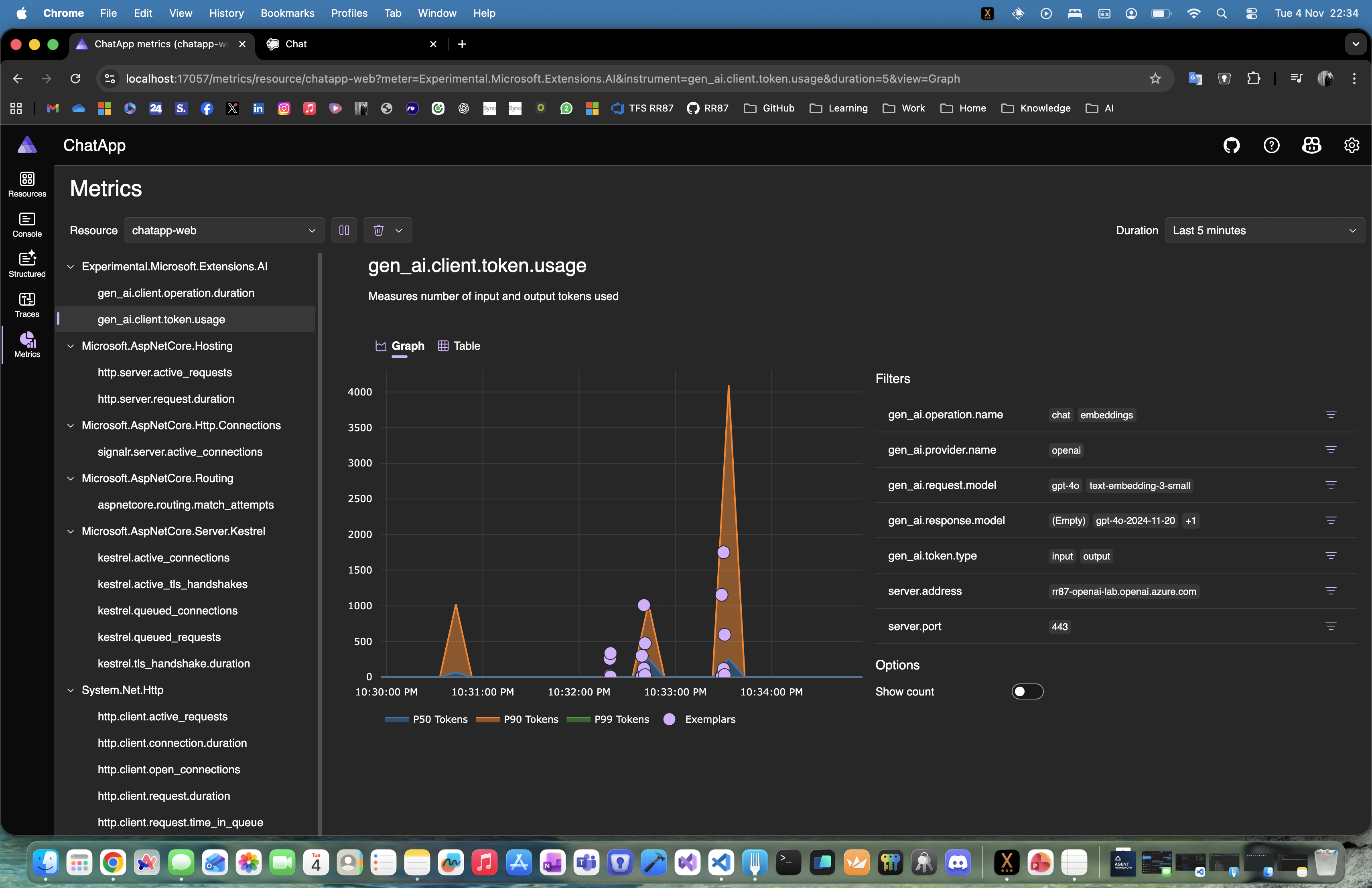
With the new Microsoft Agent Framework and .NET Aspire orchestration, you can set up a complete, observable, and extensible AI solution in just a few minutes — all running locally, with built-in monitoring and Azure OpenAI integration.

If you’ve experimented with modern chat applications, you’ve probably noticed they all share a similar design.
So instead of reinventing the wheel, we’ll leverage the elegant Blazor-based front end included in Microsoft’s AI templates — and focus our energy where it matters most: the intelligence and orchestration behind it.

But where things get truly exciting is behind the scenes — where you can move from a simple chat client to a structured, observable AI system powered by Microsoft Agent Framework and .NET Aspire orchestration.

Why Use the Agent Framework?

The Microsoft Agent Framework brings much-needed architectural depth to your AI solutions. It gives you:

  • Separation of concerns – keep logic and tools outside UI components
  • Testability – verify agent reasoning and tool behavior independently
  • Advanced reasoning – support for multi-step decision flows
  • Agent orchestration – easily coordinate multiple specialized agents
  • Deep observability – gain insight into every AI operation and decision

Essentially, it lets you transform a plain chat app into an intelligent, composable system.

Why .NET Aspire Makes It Even Better

One of the best parts about using the AI templates is that everything runs through .NET Aspire.
That gives you:

  • Service discovery between components
  • Unified logging and telemetry in the Aspire dashboard
  • Health checks for every service
  • Centralized configuration for secrets, environment variables, and connection settings

With Aspire, you get orchestration, observability, and consistency across your entire local or cloud-ready environment — no extra setup required.

Continue reading “Building a .NET AI Chat App with Microsoft Agent Framework and Aspire Orchestration”

Building an AI Chat app with .NET Aspire, Ollama/OpenAI, Postgres, and Redis

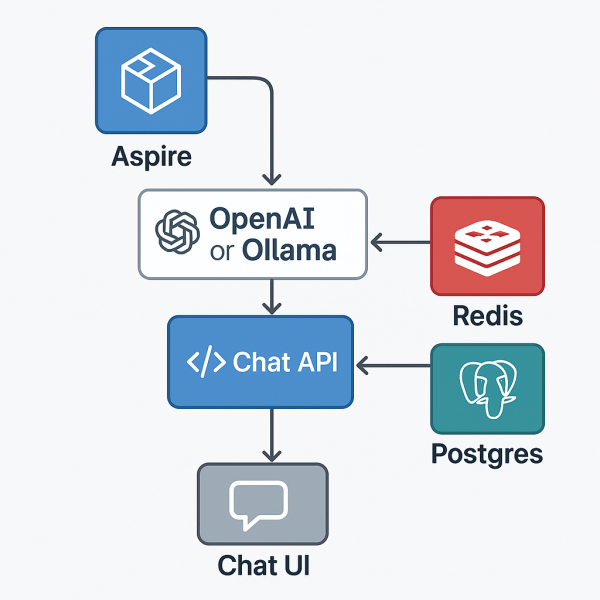
With .NET Aspire, you can orchestrate a full AI chat system — backend, model, data store, and frontend — from one place.
This sample shows how Aspire can manage a large language model (LLM), a Postgres conversation database, a Redis message broker, and a React-based chat UI, all within a single orchestration file.

Folder layout

11_AIChat/
├─ AppHost/ # Aspire orchestration
├─ ChatApi/ # .NET 9 backend API (SignalR + EF)
├─ chatui/ # React + Vite frontend
├─ ServiceDefaults/ # shared settings (logging, health, OTEL)
└─ README.md

Overview

This example demonstrates:

  • AI model orchestration with local Ollama or hosted OpenAI
  • Postgres database for conversation history
  • Redis for live chat streaming and cancellation coordination
  • Chat API using ASP.NET Core + SignalR
  • React/Vite frontend for real-time conversations
  • Full Docker Compose publishing via Aspire

The AppHost (orchestration)

AppHost/Program.cs

var builder = DistributedApplication.CreateBuilder(args);

// Publish this as a Docker Compose application
builder.AddDockerComposeEnvironment("env")
       .WithDashboard(db => db.WithHostPort(8085))
       .ConfigureComposeFile(file =>
       {
           file.Name = "aspire-ai-chat";
       });

// The AI model definition
var model = builder.AddAIModel("llm");

if (OperatingSystem.IsMacOS())
{
    model.AsOpenAI("gpt-4o-mini");
}
else
{
    model.RunAsOllama("phi4", c =>
    {
        c.WithGPUSupport();
        c.WithLifetime(ContainerLifetime.Persistent);
    })
    .PublishAsOpenAI("gpt-4o-mini");
}

// Postgres for conversation history
var pgPassword = builder.AddParameter("pg-password", secret: true);

var db = builder.AddPostgres("pg", password: pgPassword)
                .WithDataVolume(builder.ExecutionContext.IsPublishMode ? "pgvolume" : null)
                .WithPgAdmin()
                .AddDatabase("conversations");

// Redis for message streams + coordination
var cache = builder.AddRedis("cache").WithRedisInsight();

// Chat API service
var chatapi = builder.AddProject<Projects.ChatApi>("chatapi")
                     .WithReference(model).WaitFor(model)
                     .WithReference(db).WaitFor(db)
                     .WithReference(cache).WaitFor(cache);

// Frontend served via Vite
builder.AddNpmApp("chatui", "../chatui")
       .WithNpmPackageInstallation()
       .WithHttpEndpoint(env: "PORT")
       .WithReverseProxy(chatapi.GetEndpoint("http"))
       .WithExternalHttpEndpoints()
       .WithOtlpExporter()
       .WithEnvironment("BROWSER", "none");

builder.Build().Run();
Continue reading “Building an AI Chat app with .NET Aspire, Ollama/OpenAI, Postgres, and Redis”

Website Powered by WordPress.com.

Up ↑