Getting Started with the Microsoft Agent Framework and Azure OpenAI – My First Five .NET 9 Samples

Over the last few days, I’ve been exploring Microsoft’s new Agent Framework, a preview library that brings structured, context-aware AI capabilities directly into .NET applications.
To get familiar with its architecture and basic features, I’ve built five small “Getting Started” console samples in .NET 9, all powered by Azure OpenAI and defined via a simple .env configuration.

Each example builds upon the previous one — from a simple agent call to multi-turn conversations, function tools, approvals, and structured object outputs.

01 – SimpleAgent

The most basic example: connecting to Azure OpenAI using AzureKeyCredential, creating a simple AIAgent, and asking a question.

AIAgent agent = new AzureOpenAIClient(
    new Uri(endpoint),
    new AzureKeyCredential(key))
    .GetChatClient(deployment)
    .CreateAIAgent(instructions: "Tell me which language is most popular for development.", name: "Developer Assistant");

Console.WriteLine(await agent.RunAsync("Tell me which language is most popular for development."));

02 – ThreadAgent

Introduces multi-turn conversation threads that preserve context between user messages.

AgentThread thread = agent.GetNewThread();
Console.WriteLine(await agent.RunAsync("Tell me which language is most popular for development.", thread));
Console.WriteLine(await agent.RunAsync("Now tell me which of them to use if I want to build a web application in Microsoft ecosystem.", thread));

03 – FunctionTool

Shows how to extend the agent with function tools (custom methods) that can be invoked automatically by the AI when relevant.

[Description("Talk about dogs and provide interesting facts, tips, or stories.")]
static string TalkAboutDogs(string topic) =>
    topic.ToLower() switch
    {
        "labrador" => "Labradors are friendly and full of energy.",
        "poodle" => "Poodles are smart and hypoallergenic.",
        _ => $"Dogs are amazing companions! 🐶"
    };

var agent = new AzureOpenAIClient(new Uri(endpoint), new AzureKeyCredential(key))
    .GetChatClient(deployment)
    .CreateAIAgent("You are a funny assistant who loves dogs.",
                   tools: [AIFunctionFactory.Create(TalkAboutDogs)]);
Continue reading “Getting Started with the Microsoft Agent Framework and Azure OpenAI – My First Five .NET 9 Samples”

Building an AI Chat app with .NET Aspire, Ollama/OpenAI, Postgres, and Redis

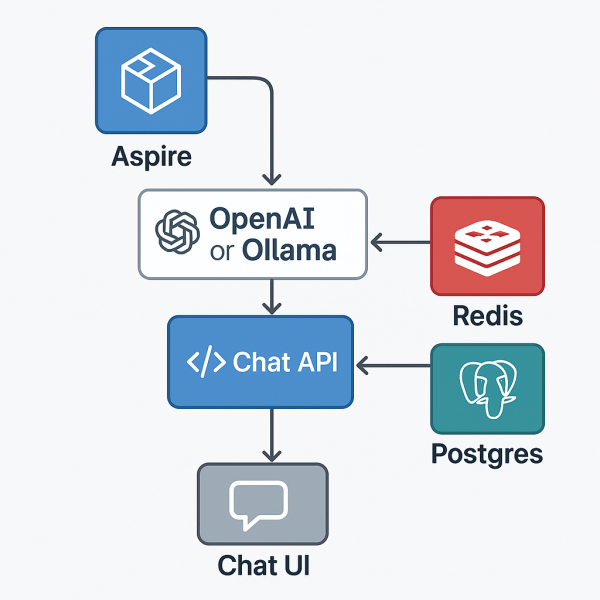
With .NET Aspire, you can orchestrate a full AI chat system — backend, model, data store, and frontend — from one place.
This sample shows how Aspire can manage a large language model (LLM), a Postgres conversation database, a Redis message broker, and a React-based chat UI, all within a single orchestration file.

Folder layout

11_AIChat/
├─ AppHost/ # Aspire orchestration
├─ ChatApi/ # .NET 9 backend API (SignalR + EF)
├─ chatui/ # React + Vite frontend
├─ ServiceDefaults/ # shared settings (logging, health, OTEL)
└─ README.md

Overview

This example demonstrates:

  • AI model orchestration with local Ollama or hosted OpenAI
  • Postgres database for conversation history
  • Redis for live chat streaming and cancellation coordination
  • Chat API using ASP.NET Core + SignalR
  • React/Vite frontend for real-time conversations
  • Full Docker Compose publishing via Aspire

The AppHost (orchestration)

AppHost/Program.cs

var builder = DistributedApplication.CreateBuilder(args);

// Publish this as a Docker Compose application
builder.AddDockerComposeEnvironment("env")
       .WithDashboard(db => db.WithHostPort(8085))
       .ConfigureComposeFile(file =>
       {
           file.Name = "aspire-ai-chat";
       });

// The AI model definition
var model = builder.AddAIModel("llm");

if (OperatingSystem.IsMacOS())
{
    model.AsOpenAI("gpt-4o-mini");
}
else
{
    model.RunAsOllama("phi4", c =>
    {
        c.WithGPUSupport();
        c.WithLifetime(ContainerLifetime.Persistent);
    })
    .PublishAsOpenAI("gpt-4o-mini");
}

// Postgres for conversation history
var pgPassword = builder.AddParameter("pg-password", secret: true);

var db = builder.AddPostgres("pg", password: pgPassword)
                .WithDataVolume(builder.ExecutionContext.IsPublishMode ? "pgvolume" : null)
                .WithPgAdmin()
                .AddDatabase("conversations");

// Redis for message streams + coordination
var cache = builder.AddRedis("cache").WithRedisInsight();

// Chat API service
var chatapi = builder.AddProject<Projects.ChatApi>("chatapi")
                     .WithReference(model).WaitFor(model)
                     .WithReference(db).WaitFor(db)
                     .WithReference(cache).WaitFor(cache);

// Frontend served via Vite
builder.AddNpmApp("chatui", "../chatui")
       .WithNpmPackageInstallation()
       .WithHttpEndpoint(env: "PORT")
       .WithReverseProxy(chatapi.GetEndpoint("http"))
       .WithExternalHttpEndpoints()
       .WithOtlpExporter()
       .WithEnvironment("BROWSER", "none");

builder.Build().Run();
Continue reading “Building an AI Chat app with .NET Aspire, Ollama/OpenAI, Postgres, and Redis”

Website Powered by WordPress.com.

Up ↑