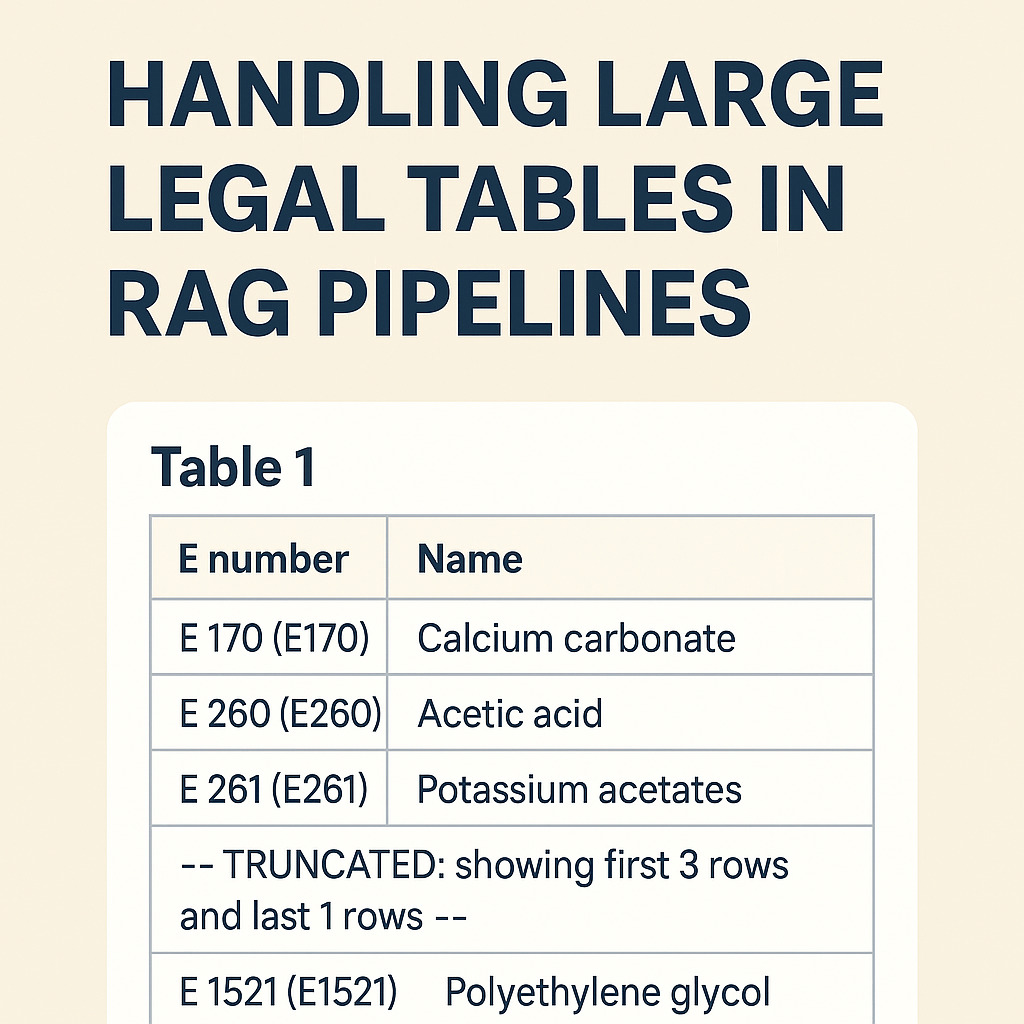
A Practical Guide to Handling Large Legal Tables in RAG Pipelines
When working with legal documents—especially EU legislation like EUR-Lex—you quickly run into a hard problem: tables.
Not small tables.
Not friendly tables.
But hundreds-row, multi-page tables buried inside 300+ page PDFs, translated into 20+ languages.
If you are building a Retrieval-Augmented Generation (RAG) system, naïvely embedding these tables almost always fails. You end up with embeddings that contain nothing more than:
“Table 1”
…and none of the actual data users are searching for.
This post describes a production-grade approach to handling large legal tables in a RAG pipeline, based on real issues encountered while indexing EU regulations (e.g. Regulation (EC) No 1333/2008).
The Core Problem
Let’s start with a real example from EUR-Lex:
ANNEX III
PART 6
Table 1 — Definitions of groups of food additives
The table itself contains hundreds of rows like:
- E 170 — Calcium carbonate
- E 260 — Acetic acid
- E 261 — Potassium acetates
- …
What goes wrong in many pipelines
- The table heading (“Table 1”) is detected as a section.
- The actual
<table>element is ignored or stored separately. - Embeddings are generated from the heading text only.
Result:
Embedding text length: 7
Embedding content: "Table 1"
The data exists visually—but not semantically.
Design Goals
We defined a few non-negotiable goals:
- The table must be searchable
Queries like “E170 calcium carbonate” must hit the table. - IDs must be stable and human-readable
ANNEX_III_PART_6_TABLE_1is better than_TBL0. - Structured data must be preserved
We want JSON rows for precise answering, not just text. - Embeddings must stay within limits
Some tables have hundreds of rows.
Step 1: Treat Tables as First-Class Sections
Instead of treating tables as “special paragraphs”, we model them as real sections:
ANNEX III
└── PART 6
    └── TABLE 1
Key rule:
The visible table heading is always the root ID.
So the canonical ID becomes:
ANNEX_III_PART_6_TABLE_1Any internal or temporary table IDs (e.g. _TBL0) are merged into this root.
Step 2: Store Structured Data Separately (TableJson)
For every table, we extract structured rows:
[
  { "E": "170", "Name": "Calcium carbonate" },
  { "E": "260", "Name": "Acetic acid" },
  { "E": "261", "Name": "Potassium acetates" }
]
This TableJson is preserved in full, regardless of size.
Why this matters:
- Enables deterministic answers
- Enables UI rendering
- Prevents hallucination (“the model said E999 exists”)
Step 3: Generate Rich Text for Embeddings
Embeddings still work best on natural language, not raw JSON.
So we generate a flattened, human-readable representation of the table.
Normalization rules
- Normalize E-numbers in both forms:
E 170 (E170) - Calcium carbonateThis ensures matching with and without spaces.
Remove junk rows:
- Amendment references (
▼M20) - Empty rows
- Layout artifacts
Step 4: Head + Tail Sampling for Large Tables
Embedding the entire table is often impossible.
Instead, we use a head + tail sampling strategy:
Rules
- If the table fits within
maxChars→ include everything - Otherwise:
- Up to 20 rows from the start (minimum 5 if space allows)
- A clear truncation marker
- Up to 5 rows from the end
- No duplication between head and tail
Example output:
Table 1 - Definitions of groups of food additives
Columns: E number | Name
Rows: 312 (showing first 20 rows and last 5 rows)

E 170 (E170) - Calcium carbonate
E 260 (E260) - Acetic acid
E 261 (E261) - Potassium acetates
...

--- TRUNCATED: showing first 20 rows and last 5 rows ---

E 1520 (E1520) - Propylene glycol
E 1521 (E1521) - Polyethylene glycol
This gives the embedding model:
- context
- representative data
- awareness that truncation occurred
Step 5: Safe Trimming (Never Cut Mid-Row)
Even after sampling, text may exceed limits.
We implemented safe trimming:
- Try to cut at:
\r\n,\n- tab (
\t) - separators (
;,|,-, space)
- Only hard-cut as a last resort
- Trimming happens after assembling head + marker + tail
This guarantees:
- no broken rows
- no half E-numbers
- no corrupted semantics
Step 6: Deterministic Row Ordering
Legal tables must preserve document order.
Rows are sorted using:
OrderBy(Row.Index).ThenBy(Row.OriginalPosition)This ensures:
- stable embeddings
- reproducible results
- correct legal interpretation
Final Result
After these changes:
ANNEX_III_PART_6_TABLE_1contains:- full
TableJson - rich, searchable embedding text
- full
- Queries like:
- “Is E170 allowed?”
- “Which additive is calcium carbonate?”
- Hit the correct table, not a random paragraph
And most importantly:
The system finally understands what the table means, not just that it exists.
Key Takeaways
- Tables are not paragraphs
- Headings must be the canonical identity
- Structured data and embedding text serve different purposes
- Head+tail sampling beats naïve truncation
- Deterministic, safe text generation matters more than model choice
If you work with legal, regulatory, or standards documents, getting tables right is often the difference between a toy RAG system and a production-ready one.
That’s all folks!
Cheers!
Gašper Rupnik
{End.}

 RaspeR87's Blog
Leave a comment