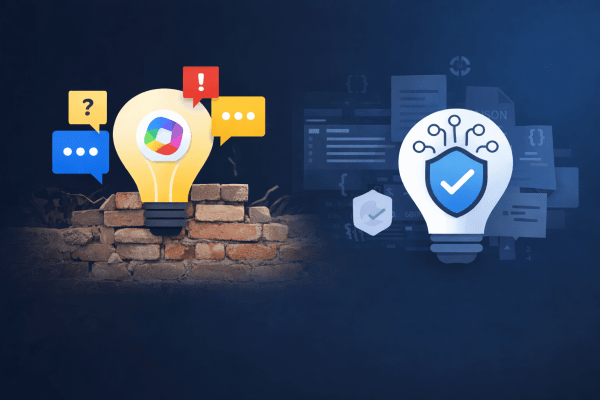
When Low-Code Copilot Agents Hit the Wall — and Why Microsoft 365 Agents Toolkit Matters

I tried to build a trustworthy Copilot agent using Copilot Studio and quickly ran into hard platform limits: inconsistent citations, non-clickable sources, and no reliable control over how answers are rendered. The experience reinforced a familiar truth: low-code works until it suddenly doesn’t.
Microsoft 365 Agents Toolkit and declarative agents exist precisely to solve this problem — and once I switched, everything clicked.


The Original Goal: A Trustworthy Copilot Agent

I started with what seemed like a straightforward goal: build a useful Copilot agent that calls custom backend logic and returns trustworthy, source-backed answers. Not a creative assistant, not a chatty helper — but an agent suitable for regulatory, policy, and compliance questions, where accuracy and traceability matter more than tone.

Naturally, I began with Copilot Studio. It promises low-code extensibility, API integration, and built-in support for sources — exactly what such an agent should need.

And at first, it worked.

But very quickly, I ran into a familiar pattern that anyone who has spent enough time with low-code platforms will recognize:
answers without sources, then answers with sources, then sources that are not clickable, then clickable sources that disappear behind a generic “Sources” button — and finally, no way to reliably control how any of this is rendered.

At that point, the problem was no longer about configuration. It was architectural.


Phase 1 – Copilot Studio: Where Things Start to Break

Copilot Studio is optimized for:

  • conversational flows,
  • orchestration,
  • and productivity scenarios.

That becomes obvious as soon as you try to build something deterministic.

What We Implemented

  • A custom Copilot action
  • Calling a custom WebAPI
  • Returning structured data:
{
"answer": "...",
"sources": [...]
}

On paper, this should be enough.

In practice, it isn’t.

Continue reading “When Low-Code Copilot Agents Hit the Wall — and Why Microsoft 365 Agents Toolkit Matters”
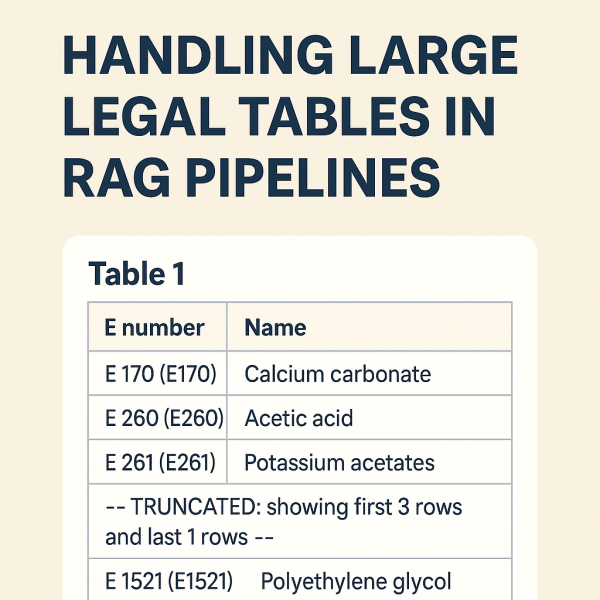
From “Table 1” to Searchable Knowledge

A Practical Guide to Handling Large Legal Tables in RAG Pipelines

When working with legal documents—especially EU legislation like EUR-Lex—you quickly run into a hard problem: tables.

Not small tables.
Not friendly tables.
But hundreds-row, multi-page tables buried inside 300+ page PDFs, translated into 20+ languages.

If you are building a Retrieval-Augmented Generation (RAG) system, naïvely embedding these tables almost always fails. You end up with embeddings that contain nothing more than:

“Table 1”

…and none of the actual data users are searching for.

This post describes a production-grade approach to handling large legal tables in a RAG pipeline, based on real issues encountered while indexing EU regulations (e.g. Regulation (EC) No 1333/2008).


The Core Problem

Let’s start with a real example from EUR-Lex:

ANNEX III
PART 6
Table 1 — Definitions of groups of food additives

The table itself contains hundreds of rows like:

  • E 170 — Calcium carbonate
  • E 260 — Acetic acid
  • E 261 — Potassium acetates

What goes wrong in many pipelines

  1. The table heading (“Table 1”) is detected as a section.
  2. The actual <table> element is ignored or stored separately.
  3. Embeddings are generated from the heading text only.

Result:

Embedding text length: 7
Embedding content: "Table 1"

The data exists visually—but not semantically.


Design Goals

We defined a few non-negotiable goals:

  1. The table must be searchable
    Queries like “E170 calcium carbonate” must hit the table.
  2. IDs must be stable and human-readable
    ANNEX_III_PART_6_TABLE_1 is better than _TBL0.
  3. Structured data must be preserved
    We want JSON rows for precise answering, not just text.
  4. Embeddings must stay within limits
    Some tables have hundreds of rows.
Continue reading “From “Table 1” to Searchable Knowledge”

Why General AI Assistants Aren’t Enough: The Case for Domain-Specific Enterprise AI Systems

Over the past two years, the tech landscape has been transformed by generative AI tools like Microsoft Copilot, ChatGPT, Gemini, and others. These assistants have become essential for daily productivity: they summarize documents, write code, answer questions, and drastically improve workflows.

But as soon as organizations begin exploring serious automation of regulated, multi-step, domain-specific processes, one reality becomes clear:

General-purpose AI assistants are not built for high-precision enterprise use cases.

This isn’t a flaw — it’s simply not their mission.
For enterprise-grade scenarios, businesses require specialized, data-aware, multi-agent AI systems designed for accuracy, compliance, and internal knowledge integration.

Here’s why.


1. Data Access ≠ Domain Understanding

Copilot and similar tools can read files from SharePoint, Teams, OneDrive, and other sources.
However, access alone does not create understanding.

General assistants cannot:

  • interpret industry-specific document structures,
  • follow multi-step regulatory logic,
  • understand cross-referenced obligations,
  • map documents across markets or jurisdictions,
  • align internal and external rules,
  • or execute deterministic procedures.

They are trained for broad, generic reasoning — not domain-structured reasoning.

Domain-specific enterprise AI systems, in contrast, are built to:

  • model relationships between documents,
  • extract structured information,
  • classify data reliably,
  • apply rule-based logic,
  • and reason across heterogeneous sources.

2. Enterprise AI Requires Traceability — Not Just an Answer

General AI models work probabilistically: they return the most likely answer.

Enterprise workflows demand something different:

  • exact citations,
  • section and paragraph references,
  • version and source transparency,
  • reproducibility,
  • evidence of reasoning,
  • strict alignment with regulatory text.

Productivity assistants cannot guarantee any of these.
Enterprise AI must — especially in domains such as:

  • compliance,
  • legal obligations,
  • regulatory affairs,
  • quality assurance,
  • product safety,
  • documentation governance.

Without traceability, AI cannot operate in regulated environments.

Continue reading “Why General AI Assistants Aren’t Enough: The Case for Domain-Specific Enterprise AI Systems”

Bringing Back My .NET MAUI Content – Starting With an Older Video (in Slovenian)

A few days ago I realized that although I’ve been actively following .NET MAUI since the very first preview releases, my blog doesn’t really show that story. In the last few years I simply didn’t have enough time to keep this place updated, which means that a lot of MAUI-related content never made it here.

So, let’s start fixing that.

Today I’m sharing a short video I recorded three years ago, back when I was still working in one of my previous companies (not my most recent one). It’s not a deeply technical, developer-oriented presentation, but more of a high-level overview that introduces the platform and what it enables.

Video: https://www.youtube.com/watch?v=WaGi6dnsTTI

Why .NET MAUI matters

.NET MAUI is a cross-platform framework that allows you to build a single application from one shared codebase, and run it on:

  • Windows
  • macOS
  • Linux
  • iOS
  • Android

This means that the same logic, UI structure, and project architecture can power desktop and mobile experiences at the same time.

And if you combine .NET MAUI with Blazor, you push this even further — a single codebase can serve:

  • Desktop apps
  • Mobile apps
  • Web applications

All with shared components, shared UI logic, and shared development patterns.

About the video

Unfortunately, the video is recorded in Slovenian and not in English — sorry to all my non-Slovenian readers — but it still gives a good introductory overview of the concepts, goals, and the direction Microsoft was taking with MAUI at the time.

Even though the video is older, the core ideas remain relevant, and it’s a nice warm-up for all the new MAUI-related content I plan to publish here.

More MAUI content coming soon

I’ve been following .NET MAUI closely from the very beginning, experimenting with previews, RC versions, and release builds. Now that I’m restarting my writing cadence, I’ll finally start sharing more of that knowledge here.

More articles, samples, and insights on .NET MAUI and Blazor Hybrid apps are coming — I promise.

That’s all folks!

Cheers!
Gašper Rupnik

{End.}

Website Powered by WordPress.com.

Up ↑